In the world of contracting and construction, ensuring timely payments for services rendered is crucial for maintaining a healthy cash flow and sustaining business operations. A key tool in achieving this is the contractor invoice, which formalizes a payment request and serves as a legally binding document that details the services provided, costs incurred, and payment terms agreed upon by both parties.
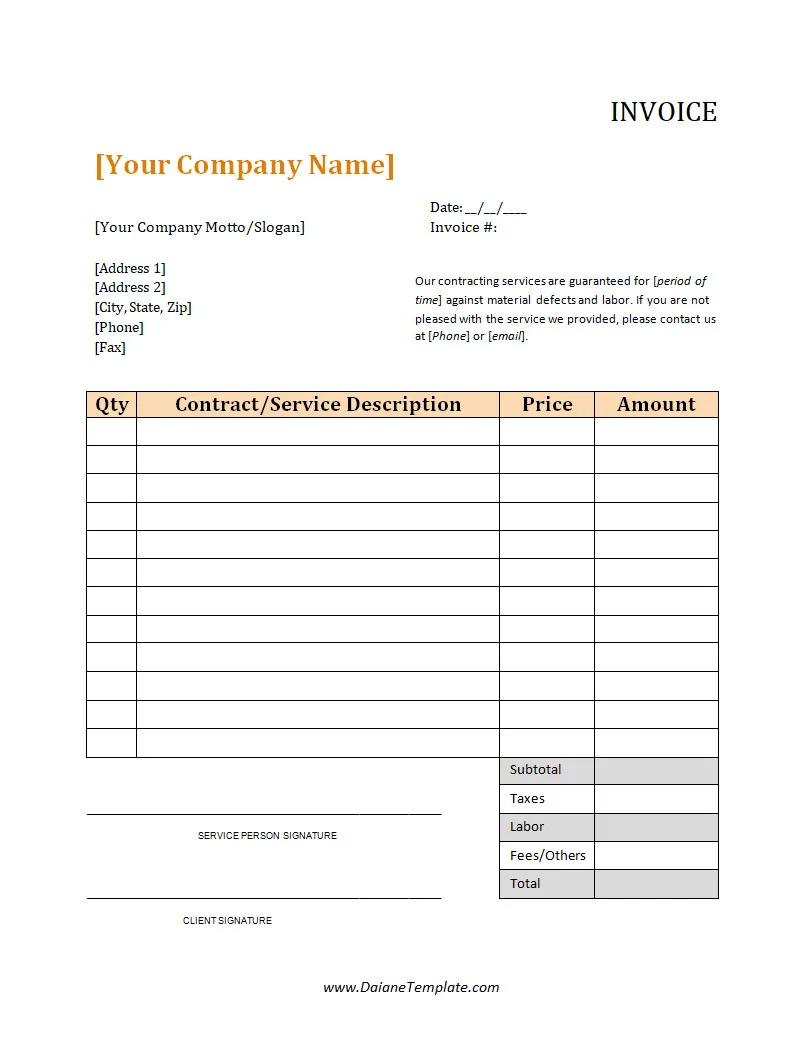
This document not only ensures transparency in financial transactions but also helps maintain clear records for both the contractor and the client, facilitating timely payments and preventing disputes.
What Is a Contractor Invoice?
A contractor invoice is a document issued by a contractor to a client, formally requesting payment for services rendered. It serves as a professional representation of the contractor’s business, outlining the details of the work completed, the costs involved, and the terms of payment agreed upon.
By providing a breakdown of the services provided and the associated costs, a contractor invoice helps ensure clarity and transparency in financial transactions between the contractor and the client.
What Information Should Be Included in a Contractor’s Invoice?
When creating a contractor invoice, it is important to include specific details to ensure clarity and transparency in financial transactions. Some key information that should be included in a contractor’s invoice is:
Contractor Details
When creating a contractor invoice, it is crucial to include detailed information about the contractor to ensure clarity and transparency. The contractor details section should include:
- Name: The full legal name of the contractor or the contracting company.
- Address: The physical address of the contractor’s business location.
- Contact Information: Phone number and email address for the contractor for communication purposes.
- Business Registration Number: The registration number of the contractor’s business for identification and compliance purposes.
Including comprehensive contractor details in the invoice helps in establishing the identity of the contractor and provides clients with the necessary information to contact the contractor if needed.
Client Details
In addition to the contractor details, it is important to include detailed information about the client in the contractor invoice. The client details section should include:
- Name: The full name of the client or the client’s business, if applicable.
- Address: The physical address of the client for accurate record-keeping and communication.
- Contact Information: Phone number and email address of the client for communication purposes.
Including comprehensive client details in the invoice helps in identifying the recipient of the invoice and ensures that the invoice reaches the correct contact within the client’s organization.
Invoice Number and Date
Assigning a unique invoice number and including the date of issue in the contractor invoice are essential for tracking and reference purposes. The invoice number and date section should include:
- Invoice Number: A unique identifier for each invoice to differentiate it from other invoices.
- Date of Issue: The date when the invoice was issued to the client for payment.
By assigning a unique invoice number and including the date of issue, contractors can easily track and reference each invoice, preventing confusion and ensuring accurate record-keeping.
Description of Services
Providing a detailed description of the services rendered in the contractor invoice is crucial for clarity and transparency in financial transactions. The description of services section should include:
- Scope of Work: A detailed outline of the services provided, including the specific tasks completed and any deliverables.
- Additional Charges: Any additional charges or fees incurred during the project, such as overtime or materials costs.
By clearly describing the services provided and any additional charges, contractors can ensure that clients understand the value they are receiving and can easily reconcile the invoice with the work completed.
Cost Breakdown
Itemizing the costs involved in the contractor invoice helps in providing transparency and clarity regarding the financial aspects of the project. The cost breakdown section should include:
- Labor Costs: The cost of labor involved in completing the project, including hours worked and hourly rates.
- Materials Costs: The cost of materials used in the project, including itemized lists of materials and their costs.
- Other Expenses: Any other expenses incurred during the project, such as equipment rental or subcontractor fees.
By itemizing the costs involved in the project, contractors can provide clients with a clear breakdown of where their money is being spent, fostering transparency and trust in the financial aspect of the project.
Payment Terms
Clearly outlining the payment terms in the contractor invoice helps in setting expectations with clients regarding when payment is expected and how it should be made. The payment terms section should include:
- Due Date: The date by which payment is due from the client, typically within a specified number of days from the invoice date.
- Accepted Payment Methods: The methods by which payment can be made, such as bank transfer, credit card, or check.
- Late Payment Penalties: Any penalties or fees that may be incurred for late payments beyond the due date.
By clearly outlining the payment terms in the invoice, contractors can avoid misunderstandings with clients regarding payment expectations and ensure timely payments for their services.
How to Invoice as a Contractor
Invoicing as a contractor can be a straightforward process if done systematically. Here is a step-by-step guide on how to create and send invoices as a contractor:
Create a Template
Start by creating a professional invoice template that includes all the necessary details, such as your business information, client details, service description, costs, and payment terms. A well-designed template can save time and ensure consistency in your invoicing process.
Fill in the Details
Fill in the invoice template with the specific details of the services provided, including a breakdown of costs and payment terms agreed upon with the client. Be detailed in your descriptions to provide clarity and transparency in the invoice.
Assign an Invoice Number
Assign a unique invoice number to each invoice for easy tracking and reference. Numbering your invoices sequentially helps in organizing your financial records and identifying each transaction easily.
Send the Invoice
Send the completed invoice to the client through email or mail, ensuring it reaches them promptly. Include a friendly message reminding the client of the payment due date and thanking them for their business.
Follow Up
Follow up with the client to confirm receipt of the invoice and to ensure timely payment as per the agreed terms. Sending a polite reminder a few days before the due date can help in avoiding late payments and maintaining a good relationship with the client.
Record Keeping
Keep a copy of the invoice for your own records and for tax compliance purposes, maintaining clear financial records for your business. Organize your invoices in a systematic manner for easy retrieval and reference when needed.
Utilize Invoicing Software
Consider using invoicing software or online platforms to streamline your invoicing process and automate tasks such as invoicing, payment reminders, and record-keeping. Invoicing software can save time, reduce errors, and improve efficiency in managing your financial transactions.
Customize Invoices for Different Clients
Tailor your invoices to suit the specific needs and preferences of each client, including any additional information or branding that the client may require. Personalizing your invoices can enhance the client experience and strengthen your professional relationship with them.
Include Payment Terms and Policies
Clearly outline the payment terms and policies in your invoices, including due dates, accepted payment methods, and any late payment penalties. By setting clear expectations with clients, you can minimize payment delays and disputes in the future.
Track Invoice Payments
Keep track of invoice payments and follow up on any overdue invoices promptly. Maintaining a record of payment statuses can help in identifying outstanding payments and taking appropriate action to ensure timely payment from clients.
Review and Analyze Invoicing Data
Regularly review and analyze your invoicing data to identify trends, track payment patterns, and assess the financial health of your business. Use this data to make informed decisions and improve your invoicing process for better efficiency and effectiveness.
Seek Feedback from Clients
Request feedback from clients on the invoicing process to identify areas for improvement and enhance the client experience. Client feedback can help in refining your invoicing practices and ensuring client satisfaction with your services.
Stay Updated on Invoicing Regulations
Stay informed about any changes in invoicing regulations and tax laws that may impact your invoicing practices. Compliance with legal requirements is essential for avoiding penalties and maintaining the financial integrity of your business.
Collaborate with Accountants or Financial Advisors
Consider collaborating with accountants or financial advisors to ensure that your invoicing practices align with best financial practices and compliance requirements. Professional guidance can help in optimizing your invoicing process and improving your financial management.
Contractor Invoice Template
A Contractor Invoice helps independent contractors and freelancers bill clients accurately and professionally for their services. It includes essential details such as service descriptions, hours worked, rates, totals, payment terms, and due dates, ensuring clear and transparent billing. With a well-structured template, you can save time, reduce payment delays, and maintain organized financial records.
Download our Contractor Invoice Template today to streamline your invoicing process and get paid efficiently.
Contractor Invoice Template – DOWNLOAD
