A restaurant menu is an essential tool that helps customers explore available food and drink options, compare dishes, and choose meals that suit their preferences. A well-organized menu also helps restaurant owners present their offerings clearly, communicate prices, and create a consistent dining experience.
Whether you operate a casual cafe, family restaurant, fine dining establishment, or food business, an effective restaurant menu can influence customer decisions and support daily operations. Clear descriptions, logical categories, readable typography, and accurate pricing make it easier for guests to order confidently.
In this guide, you will learn what a restaurant menu should include, how to organize menu categories, and how to create an attractive and practical design. You will also find a sample menu structure, useful design tips, and answers to frequently asked questions.
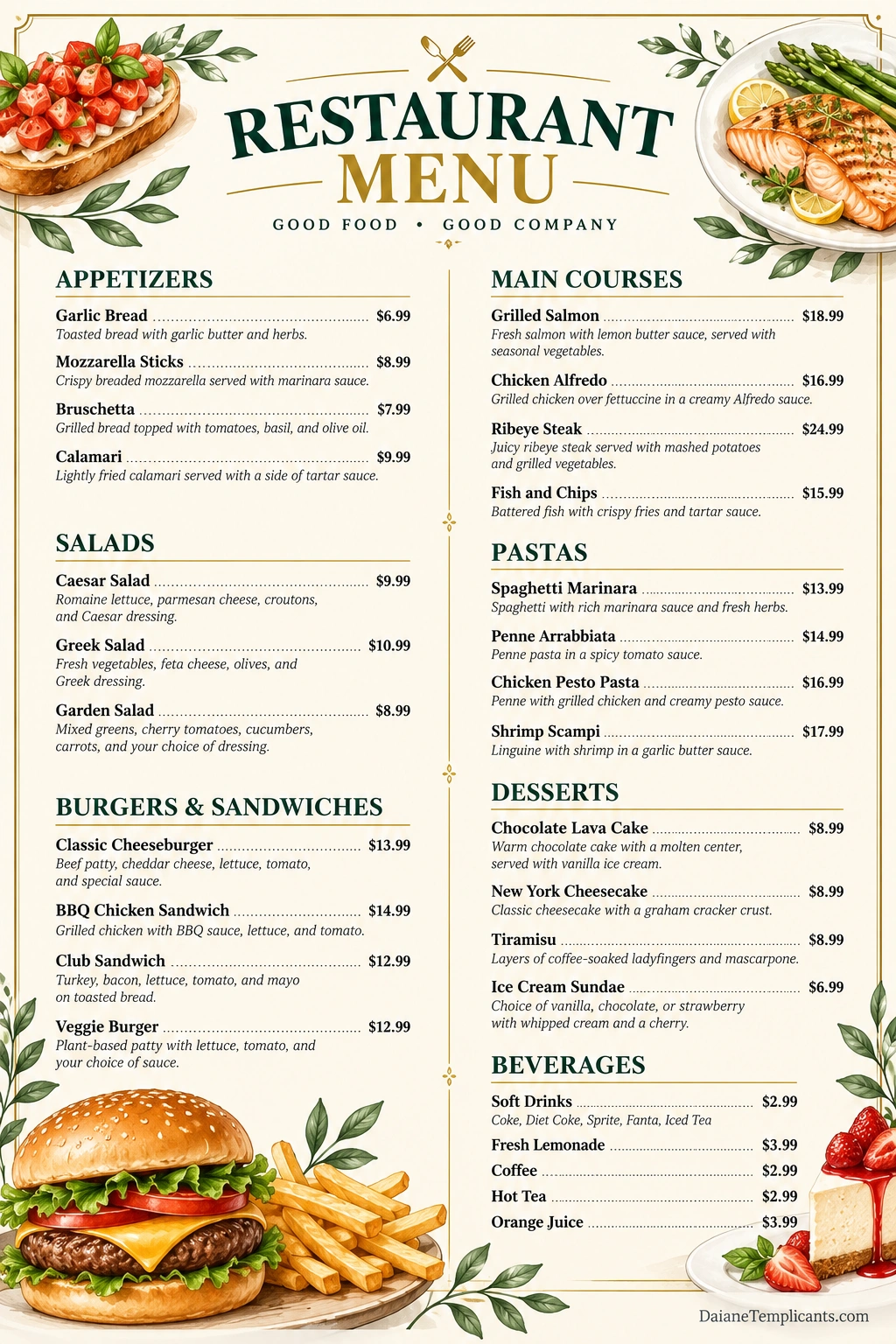
What Is a Restaurant Menu?
A restaurant menu is a printed or digital list of the food and beverages a restaurant offers. It provides customers with information about available dishes, ingredients, portion options, and prices, helping them decide what to order.
Menus vary depending on the restaurant’s concept, cuisine, service style, and target audience. A neighborhood cafe may use a short menu featuring coffee, sandwiches, and pastries, while a full-service restaurant may offer separate sections for appetizers, main courses, desserts, and drinks.
Restaurant menus also serve an operational purpose. They help staff communicate available items, manage customer expectations, coordinate orders with the kitchen, and maintain consistency in pricing and presentation.
Why Is a Well-Designed Restaurant Menu Important?
A thoughtfully designed menu does more than list dishes. It helps customers navigate their options and allows the restaurant to communicate its identity clearly.
1. Helps Customers Choose Easily
Organized categories and concise descriptions make it easier for guests to compare dishes. Customers can quickly identify appetizers, entrees, sides, desserts, and drinks without searching through a confusing list.
2. Communicates the Restaurant’s Identity
Colors, typography, photography, and wording can reflect the restaurant’s personality. A rustic cafe may use warm colors and simple descriptions, while an upscale restaurant may prefer elegant typography and a minimal layout.
3. Presents Prices Transparently
Clear pricing helps customers understand the cost of their selections before ordering. Accurate prices also reduce misunderstandings between customers and staff.
4. Supports Restaurant Operations
A consistent menu helps servers communicate orders and gives kitchen staff a clear reference for the dishes being offered. It can also help management review ingredient requirements, portion sizes, and menu performance.
5. Highlights Popular and Profitable Dishes
Strategic menu organization can draw attention to signature dishes and items the restaurant wants customers to notice. These choices should remain easy to understand and accurately described rather than relying on confusing design tricks.
What Should a Restaurant Menu Include?
The contents of a restaurant menu depend on the cuisine and service model. However, most menus benefit from a consistent structure and clear information.
Restaurant Name and Branding
Place the restaurant’s name prominently near the top. A logo, short tagline, or distinctive visual style can help customers recognize the business and create a consistent brand experience.
Food Categories
Group dishes into logical sections so customers can find what they want quickly. Common categories include appetizers, salads, main courses, pasta, burgers, sandwiches, sides, and desserts.
Dish Names
Use short, descriptive names that make each item easy to identify. Creative names can reflect the restaurant’s personality, but they should not leave customers uncertain about what a dish contains.
Food Descriptions
Write concise descriptions that explain the main ingredients, preparation method, flavor profile, or serving style. Focus on details that help customers make informed decisions.
Prices
Display prices consistently and verify that they match the restaurant’s current ordering system. If prices vary by size, portion, or customization, explain those differences clearly.
Beverage Options
Include drinks such as water, soft drinks, coffee, tea, juices, or specialty beverages when offered. A separate beverage section can make the menu easier to scan.
Dietary and Allergen Information
Where appropriate, identify vegetarian, vegan, gluten-free, or other dietary options. Avoid making unsupported allergen or dietary claims. Restaurants should maintain accurate ingredient information and follow applicable food-allergen disclosure requirements.
Common Types of Restaurant Menus
Different restaurant formats require different menu structures. Choosing the right type helps align the menu with the dining experience and business model.
A La Carte Menu
An a la carte menu lists individual dishes with separate prices. Customers can choose items independently, making this format suitable for restaurants that offer a variety of appetizers, entrees, sides, and desserts.
Table d’Hote or Set Menu
A set menu offers a fixed combination of dishes, often for one price. It may include several courses and is commonly used for special occasions, group dining, or restaurants that want to simplify meal selection.
Daily Specials Menu
A daily specials menu highlights dishes available for a limited time. It can help restaurants feature seasonal ingredients, introduce new recipes, or use ingredients that are especially fresh or readily available.
Seasonal Menu
A seasonal menu changes according to ingredient availability, customer preferences, or the time of year. It allows restaurants to refresh their offerings and showcase seasonal flavors.
Digital QR Code Menu
A digital menu allows customers to view food and beverage options on a phone or other device. Restaurants can update prices and availability without reprinting every copy, although the digital version should remain readable and accessible.
Takeout and Delivery Menu
A takeout menu focuses on dishes that travel well and can be packaged conveniently. It should include clear prices, portion details, available add-ons, and any information customers need to place an accurate order.
How to Create a Restaurant Menu Step by Step
Creating a restaurant menu involves more than choosing attractive colors. Follow these steps to develop a menu that is practical, readable, and consistent with your business.
Step 1: Define Your Restaurant Concept
Start by identifying your cuisine, target audience, price range, and service style. A family restaurant may need accessible descriptions and a broad selection, while a specialty restaurant may focus on a smaller number of signature dishes.
Step 2: Select Your Menu Items
Choose dishes that match your concept, kitchen capabilities, ingredient availability, and customer expectations. Avoid including too many items if doing so makes inventory management or consistent preparation difficult.
Step 3: Organize Categories Logically
Arrange dishes in an order that feels natural to customers. A traditional structure may begin with appetizers, continue with salads and main courses, and finish with desserts and beverages.
Step 4: Write Clear Descriptions
Describe each dish using accurate, appealing language. Mention important ingredients and preparation methods without making the description unnecessarily long. Ensure that the wording reflects what customers will actually receive.
Step 5: Set and Verify Prices
Review ingredient costs, labor, portion sizes, overhead, competitor positioning, and customer expectations when setting prices. Confirm that listed prices match your point-of-sale system and online ordering platforms.
Step 6: Choose a Suitable Design
Select typography, colors, spacing, and visual elements that fit your brand. Use enough contrast between the text and background, and make sure descriptions and prices remain readable in print and on screens.
Step 7: Review and Test the Menu
Proofread every item, verify spelling and prices, and check that descriptions are accurate. If possible, ask someone unfamiliar with the menu to find a particular dish or understand an item description. Their feedback can reveal confusing sections.
Restaurant Menu Sample
The following example demonstrates a simple restaurant menu layout. The dishes and prices are illustrative and should be replaced with your restaurant’s actual offerings and pricing.
Sample Restaurant Menu
Restaurant Name: The Garden Table
Tagline: Fresh Flavors, Friendly Dining
Appetizers
- Garlic Bread — $6.99: Toasted bread with garlic butter and herbs.
- Bruschetta — $7.99: Grilled bread topped with tomatoes, basil, and olive oil.
- Mozzarella Sticks — $8.99: Crispy breaded mozzarella served with marinara sauce.
Salads
- Caesar Salad — $9.99: Romaine lettuce, Parmesan cheese, croutons, and Caesar dressing.
- Greek Salad — $10.99: Fresh vegetables, feta cheese, olives, and Greek dressing.
- Garden Salad — $8.99: Mixed greens, tomatoes, cucumbers, and your choice of dressing.
Main Courses
- Grilled Salmon — $18.99: Salmon with lemon butter sauce and seasonal vegetables.
- Chicken Alfredo — $16.99: Grilled chicken and fettuccine in a creamy Alfredo sauce.
- Fish and Chips — $15.99: Battered fish served with crispy fries and tartar sauce.
Burgers and Sandwiches
- Classic Cheeseburger — $13.99: Beef patty, cheddar cheese, lettuce, tomato, and house sauce.
- BBQ Chicken Sandwich — $14.99: Grilled chicken with barbecue sauce, lettuce, and tomato.
- Veggie Burger — $12.99: Plant-based patty with lettuce, tomato, and house sauce.
Desserts
- Chocolate Lava Cake — $8.99: Warm chocolate cake with a molten center.
- New York Cheesecake — $8.99: Classic cheesecake with a graham cracker crust.
- Tiramisu — $8.99: Layers of coffee-soaked ladyfingers and mascarpone.
Beverages
- Soft Drinks — $2.99
- Fresh Lemonade — $3.99
- Coffee or Hot Tea — $2.99
- Orange Juice — $3.99
This sample illustrates how a restaurant can separate dishes into recognizable categories, provide concise descriptions, and display prices consistently. Adjust the menu structure to match your cuisine, customer needs, and service format.
Restaurant Menu Design Tips
A professional menu should look attractive while remaining easy to use. Apply these design principles when creating a printable or digital restaurant menu.
- Use readable typography: Choose fonts that remain clear at the intended print size or screen resolution.
- Create visual hierarchy: Make category headings distinct from dish names and descriptions.
- Maintain consistent spacing: Use predictable gaps and alignment so customers can scan the menu comfortably.
- Choose suitable colors: Match the restaurant’s brand while maintaining strong text contrast.
- Use images selectively: High-quality food photography or illustrations can highlight signature dishes, but too many images may make the menu cluttered.
- Keep descriptions concise: Focus on ingredients, preparation, and details that help customers choose.
- Check print quality: Ensure text, images, and prices remain clear when printed at the intended size.
- Design for mobile devices: For digital menus, use readable text, simple navigation, and links that work well on smaller screens.
- Make updates easy: Keep an editable source file so prices, seasonal dishes, and availability can be changed efficiently.
How Restaurant Owners Can Manage Menu Updates
A restaurant menu should reflect what the business can actually prepare and serve. Regular reviews help keep information accurate and support efficient operations.
Review Item Performance
Track sales and customer feedback to identify popular dishes and items that are rarely ordered. Consider whether low-performing items need clearer descriptions, different pricing, or removal from the menu.
Monitor Ingredient Costs
Ingredient prices and availability can change. Review recipe costs and portion sizes periodically to determine whether menu prices remain appropriate.
Coordinate With Kitchen Staff
Make sure the kitchen can prepare each listed item consistently and that staff know about ingredient substitutions, unavailable dishes, and special preparation requirements.
Keep All Menu Versions Consistent
If your restaurant uses printed menus, a website, delivery services, and QR code menus, update them together. Inconsistent prices or availability can frustrate customers and create extra work for staff.
Frequently Asked Questions About Restaurant Menus
What is the main purpose of a restaurant menu?
A restaurant menu lists the food and beverages available for customers to order. It helps guests compare options and prices while giving restaurant staff a consistent reference for the items offered.
What should a restaurant menu include?
A typical menu includes the restaurant name, food categories, dish names, descriptions, prices, and beverage options. Dietary information and allergen details may also be needed, depending on the dishes and applicable requirements.
How many items should a restaurant menu have?
There is no universal ideal number. The right menu size depends on the restaurant’s concept, kitchen capacity, ingredient supply, and customer expectations. A focused selection can make ordering easier and simplify operations.
What makes a restaurant menu attractive?
A strong menu combines readable typography, clear categories, consistent spacing, accurate descriptions, and a design that matches the restaurant’s brand. Food images can be useful when they support rather than overwhelm the layout.
Should a restaurant use a printed or digital menu?
Both formats can work well. Printed menus are easy to browse without a device, while digital menus can be updated quickly. Some restaurants use both to accommodate different customer preferences and service needs.
How often should a restaurant menu be updated?
Review the menu whenever prices, ingredients, availability, or recipes change. Seasonal restaurants may update menus regularly, while other businesses may need only occasional revisions. Prices and item availability should always remain accurate.
Can I use a restaurant menu template?
Yes. A restaurant menu template provides a starting layout for categories, dish descriptions, prices, and branding. Customize the design and content to match your restaurant’s identity and verify every detail before printing or publishing.
How do I write a good restaurant menu description?
Use concise, accurate language to describe the main ingredients, preparation method, and distinctive flavors. Avoid exaggerated claims and make sure the description matches the dish that customers will receive.
Conclusion
A restaurant menu is an important communication tool that helps customers choose meals and helps restaurant owners organize their offerings. A clear structure, appealing design, accurate prices, and useful descriptions can improve the ordering experience and reinforce the restaurant’s identity.
Start by defining your restaurant concept, selecting suitable dishes, and organizing them into logical categories. Then review the layout for readability, verify every description and price, and keep printed and digital versions consistent. With thoughtful planning, a restaurant menu template can provide a practical foundation for a professional and easy-to-use menu.
Download: Restaurant Menu Template
