A one-day conference schedule provides a clear roadmap for organizing a full day of presentations, workshops, networking activities, and breaks. It helps event organizers manage time efficiently while giving attendees a clear understanding of where they need to be and what they can expect throughout the day.
Whether you are planning a corporate conference, business seminar, professional development event, academic gathering, or industry meeting, a well-structured agenda keeps the program organized and productive. It also helps speakers prepare, venue staff coordinate transitions, and participants make the most of every session.
In this guide, you will learn how to create a one-day conference schedule, choose the right session format, allocate time effectively, and prepare a practical event agenda. You will also find a sample schedule, planning tips, and answers to frequently asked questions.
What Is a One-Day Conference Schedule?
A one-day conference schedule is a structured agenda that outlines the activities planned for a single-day event. It lists the start and end times of each session, the topics being covered, the speakers or facilitators, and the breaks between activities.
Unlike a general event checklist, a conference schedule focuses on the timing and sequence of the program. It helps everyone involved understand how the day will unfold and what needs to happen at each stage.
A typical conference agenda may include registration, welcome remarks, keynote presentations, panel discussions, workshops, networking sessions, lunch, and closing remarks. The exact format depends on the event’s objectives, audience, venue, and available resources.
Why Is a One-Day Conference Schedule Important?
A clear conference agenda helps organizers create a professional experience while making the program easier for attendees to follow. It also supports coordination among speakers, moderators, venue staff, and technical teams.
1. Keeps the Event Organized
A written schedule assigns a specific time to every activity. This reduces uncertainty and helps the organizing team prepare for transitions between presentations, discussions, meals, and networking sessions.
2. Helps Attendees Manage Their Time
Participants can review the agenda in advance and identify the sessions most relevant to their interests. They can also plan breaks, prepare questions, and coordinate meetings with other attendees.
3. Supports Speakers and Presenters
Speakers benefit from knowing their presentation times, session lengths, and transition requirements. A clearly defined agenda helps them prepare appropriate content and avoid exceeding their allocated time.
4. Creates a Better Learning Experience
Alternating presentations with discussions, practical workshops, and breaks can help maintain engagement throughout the day. A thoughtful agenda also gives participants time to reflect on new information and connect ideas.
5. Improves Coordination
Event staff can use the schedule to coordinate room access, audiovisual equipment, catering, signage, and speaker preparation. This shared reference reduces the risk of missed activities and timing conflicts.
What Should a One-Day Conference Schedule Include?
The contents of a conference agenda depend on the event’s purpose, but several elements are useful for most professional gatherings.
Event Information
Start with the conference title, date, venue, and any essential attendance information. For a digital or hybrid event, include access details and instructions for joining online sessions.
Registration and Welcome
Allow time for attendee check-in, name badges, seating, and informal introductions. Opening remarks can then explain the conference objectives and introduce the day’s program.
Keynote Presentations
A keynote speaker often establishes the main theme of the conference. Schedule enough time for the presentation and, when appropriate, a short question-and-answer session.
Breakout Sessions and Workshops
Breakout sessions allow attendees to explore specialized topics, participate in discussions, or develop practical skills. Include room assignments and facilitator names when multiple sessions run simultaneously.
Networking Opportunities
Networking breaks help participants meet colleagues, exchange ideas, and build professional relationships. These activities work best when the schedule provides enough time for meaningful conversations rather than treating networking as an afterthought.
Meal and Refreshment Breaks
Include appropriate time for coffee, refreshments, and lunch. Consider dietary needs, venue arrangements, and the time required for attendees to move between rooms or locations.
Closing Session
Reserve time to summarize the main takeaways, share next steps, thank speakers and participants, and explain how attendees can access follow-up resources.
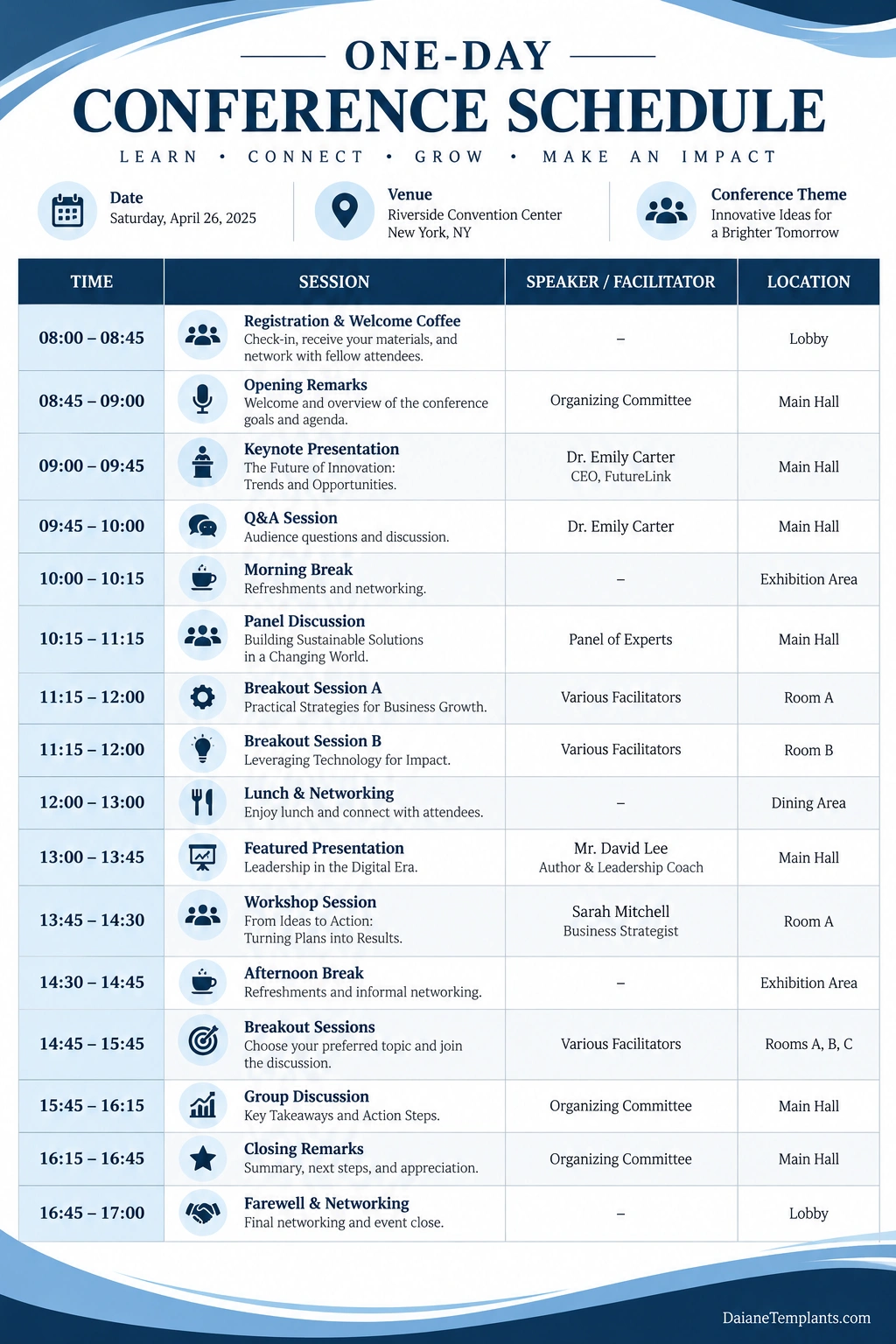
Sample One-Day Conference Schedule
The following example illustrates a balanced conference program running from 8:00 AM to 5:00 PM. It includes registration, keynote presentations, workshops, networking, lunch, and closing remarks. Adjust the times and session lengths to suit your event.
Example Conference Agenda
- 8:00 AM – 8:45 AM: Registration, check-in, and welcome coffee.
- 8:45 AM – 9:00 AM: Opening remarks and conference objectives.
- 9:00 AM – 9:45 AM: Keynote presentation: Trends and Opportunities in the Industry.
- 9:45 AM – 10:00 AM: Questions and answers.
- 10:00 AM – 10:15 AM: Morning coffee break.
- 10:15 AM – 11:15 AM: Expert panel discussion.
- 11:15 AM – 12:00 PM: Interactive workshop or breakout sessions.
- 12:00 PM – 1:00 PM: Lunch and networking.
- 1:00 PM – 1:45 PM: Afternoon keynote or featured presentation.
- 1:45 PM – 2:30 PM: Practical session or case study presentation.
- 2:30 PM – 2:45 PM: Afternoon refreshment break.
- 2:45 PM – 3:45 PM: Breakout discussions or collaborative activities.
- 3:45 PM – 4:15 PM: Group discussion and key takeaways.
- 4:15 PM – 4:45 PM: Closing presentation and next steps.
- 4:45 PM – 5:00 PM: Final announcements and departure.
This sample provides a general framework rather than a fixed formula. A technical conference may need longer presentations, while a leadership event may benefit from more discussion and networking time. Make sure the program reflects the event’s goals and the needs of its participants.
How to Create a One-Day Conference Schedule Step by Step
Planning an effective conference agenda starts with clear objectives and realistic timing. Follow these steps to create a schedule that is useful for both organizers and attendees.
Step 1: Define the Conference Goals
Identify what the event should accomplish. Your goals may include sharing industry knowledge, introducing a product, developing professional skills, presenting research, or helping participants build business relationships.
Use these goals to determine which activities deserve the most time. For example, a training conference may prioritize hands-on workshops, while an industry summit may emphasize keynote presentations and panel discussions.
Step 2: Identify Your Audience
Consider the number of attendees, their experience levels, professional interests, accessibility needs, and expectations. Understanding your audience helps you select appropriate topics, presentation formats, and networking opportunities.
Step 3: Confirm Speakers and Sessions
Identify the speakers, moderators, facilitators, and session topics before finalizing the agenda. Confirm their availability, presentation requirements, and expected duration.
Ask presenters to provide titles and short descriptions in advance. This information makes the schedule more informative and helps attendees choose sessions that interest them.
Step 4: Allocate Realistic Time Blocks
Assign start and end times to every activity, including registration, presentations, questions, meals, and room transitions. Avoid filling every minute with formal content because participants and staff need time to move between activities.
Step 5: Plan Breaks Strategically
Schedule breaks at appropriate intervals, particularly after longer presentations or intensive workshops. Provide enough time for refreshments, restrooms, and informal conversations.
Step 6: Coordinate the Venue and Technology
Confirm room capacities, seating arrangements, microphones, projectors, internet access, and any equipment required by presenters. If the conference includes parallel sessions, clearly identify room locations and transition times.
Step 7: Share the Agenda in Advance
Provide attendees with the final schedule through email, a conference website, a registration platform, or a printed program. Include the venue address, check-in time, session locations, and contact information for event support when appropriate.
Step 8: Prepare for Changes
Speakers may run late, sessions may need to change, or technical problems may occur. Designate a person responsible for communicating updates and prepare a practical backup plan for essential activities.
Tips for Making a Conference Agenda More Effective
A useful agenda balances learning, interaction, and recovery time. Use these practical tips to improve the attendee experience and help the event run smoothly.
- Prioritize the main objectives: Give the most important topics enough time rather than adding sessions simply to fill the day.
- Keep sessions focused: Use clear titles and descriptions so attendees know what each activity will cover.
- Vary the format: Combine presentations, panel discussions, workshops, and networking to maintain engagement.
- Build in transition time: Allow time for room changes, equipment setup, and speaker preparation.
- Schedule breaks consistently: Avoid long stretches of demanding sessions without opportunities to rest.
- Communicate session expectations: Explain whether participants should bring materials, prepare questions, or complete pre-event activities.
- Make the agenda accessible: Use readable text, clear headings, and formats that work for print and mobile devices.
- Assign clear responsibilities: Ensure staff know who introduces speakers, manages questions, handles technology, and announces schedule changes.
- Collect feedback: Ask attendees which sessions were most useful and what could be improved for future events.
Common Conference Scheduling Mistakes to Avoid
Even a well-planned conference can become stressful if the agenda is unrealistic or important details are missing. Avoid these common mistakes when building your schedule.
- Overloading the program: Too many sessions can leave attendees tired and reduce the time available for meaningful discussions.
- Leaving out breaks: Participants need time for refreshments, restrooms, and informal conversations.
- Ignoring speaker preparation: Confirm presentation materials and technical requirements before the event.
- Allowing no flexibility: A schedule without transition time can fall behind after even a minor delay.
- Providing unclear locations: Include room names or numbers when sessions take place in different areas.
- Failing to communicate changes: Make sure attendees and staff can receive updated information promptly.
- Neglecting accessibility: Consider mobility, hearing, visual, dietary, and other access requirements during planning.
- Forgetting the closing session: Leave time to summarize the event and communicate follow-up actions.
How to Use a Printable Conference Schedule Template
A printable conference schedule template provides a simple way to organize event activities in a consistent format. It can serve as a working document for organizers and as a quick-reference guide for attendees.
Customize the Event Details
Add the conference title, date, location, and organizer information. Include a logo or brand colors if they improve recognition without reducing readability.
Enter Sessions and Times
List each activity in chronological order. Include the session title, speaker or facilitator, start and end times, and room location when needed.
Check Timing and Accuracy
Review the schedule for overlapping sessions, unrealistic transitions, missing breaks, and incorrect speaker information. Confirm the final details with the organizing team before printing or distributing the document.
Prepare Print and Digital Versions
Use a clean, readable layout for the printed program and a mobile-friendly version for online access. If the agenda changes, update every version and clearly communicate the revision to attendees.
Frequently Asked Questions About One-Day Conference Schedules
What is a one-day conference schedule?
A one-day conference schedule is an agenda that lists the sessions, speakers, breaks, meals, and activities planned for a single-day event. It helps attendees and organizers manage time and understand the order of the program.
How many sessions should a one-day conference include?
The number depends on the conference goals, session lengths, audience, and event hours. A balanced program typically combines a manageable number of presentations or workshops with breaks, networking, and time for transitions.
How long should a conference presentation last?
Presentation length varies by topic and format. Short talks may last 15 to 30 minutes, while keynote presentations may require 30 to 60 minutes or more. Include question time when appropriate and confirm the duration with each speaker.
How much break time should be included?
Breaks should reflect the length and intensity of the sessions, venue logistics, and attendee needs. A full-day event commonly includes morning and afternoon refreshment breaks and a lunch period, with additional transition time when required.
When should attendees receive the conference agenda?
Share the agenda as early as practical so attendees can plan travel, prepare for sessions, and identify networking opportunities. Send an updated version if important details change before the event.
Can I use a printable one-day conference schedule template?
Yes. A printable template helps organize session times, speakers, locations, breaks, and closing activities. Customize it to match your conference format and verify all details before distributing it.
What should happen if a conference session runs late?
Assign an organizer or stage manager to monitor timing and communicate with speakers. Use planned transition buffers where possible, and make adjustments that preserve essential sessions without removing necessary breaks or creating confusion.
Should a conference schedule include networking?
Yes, when networking is relevant to the event’s objectives. Dedicated networking periods give attendees time to meet colleagues, exchange ideas, and build professional relationships without competing with formal presentations.
Conclusion
A one-day conference schedule helps transform a collection of presentations and activities into a coordinated, productive event. By defining clear objectives, allocating realistic time blocks, planning breaks, and communicating the agenda in advance, organizers can create a better experience for speakers and attendees.
Start with a practical schedule, confirm session details with the people involved, and leave enough flexibility to handle unexpected changes. Use a printable conference schedule template to keep information organized, make updates easy, and ensure everyone understands the day’s program.
Download: One-day Conference Schedule Template
