An address label is a simple way to display a recipient’s or sender’s mailing information on envelopes, packages, invitations, and other correspondence. Instead of handwriting the same details repeatedly, you can use printable address labels to create a neat, consistent, and professional appearance.
Whether you are preparing holiday cards, mailing invitations, organizing business correspondence, or shipping packages, the right address label can save time and improve presentation. With a printable address label template, you can choose a design that suits your needs, personalize the text, and print multiple labels on a single sheet.
In this guide, you will learn what address labels are, which types are available, what information to include, and how to create and print labels at home. You will also find practical design tips and answers to common questions about printable mailing labels.
What Is an Address Label?
An address label is a printed or handwritten label that displays mailing information. It is typically attached to an envelope, package, invitation, or other item that needs to be delivered.
A standard mailing address label usually includes the recipient’s name and complete mailing address. Some labels also include the sender’s return address, a company name, or a small decorative element.
Address labels come in many styles, from simple black-and-white layouts to colorful designs featuring flowers, borders, seasonal illustrations, and elegant typography. You can purchase preprinted labels or create your own using a printable address label template.
Why Use Printable Address Labels?
Printable address labels offer a convenient alternative to writing addresses by hand. They are useful for personal correspondence, small businesses, events, and everyday mailing tasks.
Save Time on Repetitive Mailing Tasks
If you need to send dozens of invitations, greeting cards, or packages, printing labels can reduce repetitive work. Once your address information is prepared, you can reproduce the same layout across multiple labels.
Create a Consistent Appearance
Printed labels help keep text size, spacing, and alignment consistent. This can make envelopes and packages look more organized, especially when preparing a large mailing.
Personalize Your Correspondence
Address labels can reflect your personal style or brand identity. Choose colors, fonts, borders, and illustrations that match the occasion, whether you are sending wedding invitations, holiday cards, thank-you notes, or business mail.
Make Mailing Easier to Organize
Preprinted labels can help you prepare mailing batches in advance. You can organize labels by recipient, event, customer group, or destination to make larger mailing projects easier to manage.
Types of Address Labels
The best address label depends on what you are mailing and the appearance you want to achieve. Consider the following common options.
1. Return Address Labels
Return address labels display the sender’s name and mailing address. They are usually placed in the upper-left corner of an envelope or in another appropriate location according to the mailing service’s guidance.
These labels are especially useful for holiday cards, wedding invitations, thank-you notes, and regular personal correspondence.
2. Mailing Address Labels
Mailing address labels display the recipient’s information. They are commonly used on envelopes, invitations, greeting cards, and packages.
Choose a layout that provides enough space for the recipient’s name, street address, apartment or suite number, city, state, ZIP code, and country when needed.
3. Business Address Labels
Business address labels often include a company name, department, recipient name, and mailing address. A clean, professional design can help maintain a consistent appearance across invoices, letters, and outgoing packages.
4. Decorative Address Labels
Decorative labels combine mailing information with visual elements such as flowers, leaves, ribbons, geometric borders, or seasonal illustrations. They work well for invitations, gifts, personal stationery, and special occasions.
5. Holiday and Event Address Labels
Holiday address labels may feature winter greenery, snowflakes, festive colors, or other seasonal artwork. Event labels can coordinate with wedding invitations, baby showers, birthday parties, and graduation announcements.
Free Printable Address Label Template
A printable address label template makes it easier to prepare several labels with a coordinated design. Many templates use a grid layout so you can print multiple labels on one sheet rather than creating each label separately.
The sample below features a collection of decorative address labels with pastel borders, botanical illustrations, and a clean layout for mailing information. The different designs offer inspiration for personal correspondence, invitations, and gift-related mailings.
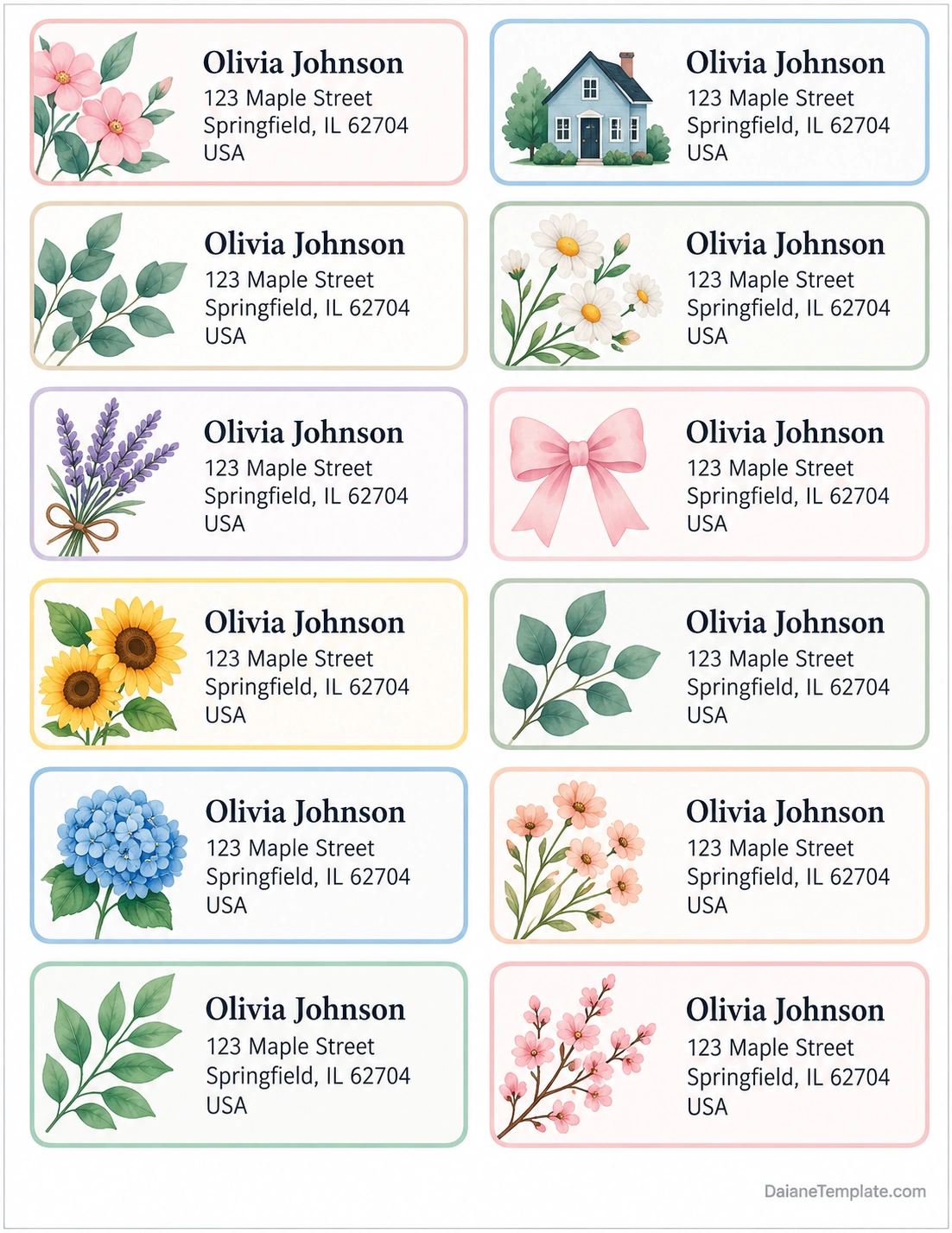
Use the sample as a visual reference when selecting a label style. Before printing, replace the example address with the correct mailing information and check that every label is readable.
What Information Should an Address Label Include?
The information on an address label depends on whether it is intended for the recipient or the sender. A clear layout helps reduce confusion and makes the address easier to read.
Recipient Name
Start with the recipient’s name or the name of the business receiving the mail. For formal correspondence, use the preferred name or business name when known.
Street Address
Include the street number and street name. Add an apartment, unit, floor, or suite number when applicable so the item can be delivered to the correct location.
City, State, and ZIP Code
For US domestic mail, include the city, state abbreviation, and ZIP code. Check the information carefully before printing a large batch of labels.
Country for International Mail
For international correspondence, include the destination country using the format recommended by the relevant postal service. Address conventions vary by country, so check the destination’s requirements before mailing.
Return Address
If you are preparing a return address label, include the sender’s name and complete return address. A return address can help identify where undeliverable mail should be returned, subject to the postal service’s procedures.
How to Create Your Own Address Labels
Creating personalized address labels is straightforward when you prepare the information and layout before printing.
Step 1: Choose a Template
Select a printable address label template that matches your purpose. A minimal design may suit business mail, while a floral or seasonal layout may be more appropriate for invitations and greeting cards.
Step 2: Enter the Address Information
Add the recipient’s name and mailing address. If you are creating return address labels, enter the sender’s details instead. Proofread names, street numbers, postal codes, and country names carefully.
Step 3: Select Fonts and Colors
Use fonts that remain easy to read at the final printed size. Dark text on a light background generally provides good contrast. Avoid overly decorative fonts for street addresses and postal codes.
Step 4: Match the Label Dimensions
If you are printing on adhesive label sheets, check the manufacturer’s dimensions and layout. The number of labels per sheet, margins, and spacing should match the template settings.
Step 5: Preview the Page
Review the complete sheet before printing. Make sure the text fits within each label and that no important details are too close to the edges.
Step 6: Print and Check
Print a test page on ordinary paper first. Hold it against the label sheet to check alignment. Once the layout is correct, print on the intended label stock using the printer settings recommended by the manufacturer.
Tips for Printing Professional-Looking Address Labels
A few simple adjustments can improve the appearance and readability of your printed labels.
- Use readable typography: Choose clear fonts and a suitable text size.
- Keep the layout simple: Avoid excessive decoration that competes with the address.
- Check alignment: Confirm that the template matches the exact label sheet dimensions.
- Use good contrast: Dark text on a light background is generally easier to read.
- Choose suitable materials: Use paper labels for ordinary correspondence and compatible adhesive labels when needed.
- Test before printing in bulk: A test print can prevent wasted label sheets.
- Protect personal information: Keep address files secure and avoid sharing recipient lists unnecessarily.
Address Labels for Different Occasions
Address labels can be adapted to a wide range of personal and professional needs. Choosing an appropriate design helps create a coordinated look without sacrificing readability.
Wedding Invitations
Use elegant typography, subtle floral details, or a simple border to complement your wedding stationery. Keep the address clear and consistent with the invitation’s overall style.
Holiday Cards
Seasonal labels can make holiday card preparation easier. Choose a festive design that leaves enough room for complete mailing information.
Small Business Mail
Business labels can include the company name and a clean, consistent layout. If you mail products regularly, consider using a standardized template to reduce formatting work.
Gifts and Thank-You Notes
Decorative address labels can add a personal touch to gift packages and thank-you cards. Floral, botanical, or minimalist designs work well for many occasions.
Common Address Label Mistakes to Avoid
Even a well-designed label can cause problems if the information is inaccurate or the layout is poorly aligned. Watch out for these common mistakes.
- Incorrect address details: Verify street numbers, unit numbers, city names, and postal codes.
- Text that is too small: Make sure the address remains readable at the final label size.
- Misaligned printing: Use the correct template and printer settings for your label sheet.
- Excessive decoration: Keep artwork away from essential address information.
- Missing country information: Include the destination country when required for international mail.
- Using incompatible label stock: Confirm that your printer supports the selected material.
Frequently Asked Questions
What is an address label used for?
An address label displays mailing information on envelopes, packages, invitations, and other correspondence. It can show the recipient’s address or the sender’s return address.
Can I print address labels at home?
Yes. You can print address labels at home using a compatible printer, printable label sheets, and a matching template. Test the layout on ordinary paper before printing on adhesive labels.
What size should an address label be?
There is no single size for every address label. The appropriate dimensions depend on the envelope, package, label sheet, and amount of information you need to display.
Can I use address labels for wedding invitations?
Yes. Address labels are a convenient option for wedding invitations. Choose a design that complements your stationery and make sure the recipient’s address is complete and easy to read.
What is the difference between an address label and a return address label?
An address label often refers to the recipient’s mailing information, while a return address label displays the sender’s information. Both can be printed using similar templates.
Can I use decorative address labels for business mail?
Yes, provided the design remains professional and the address is clear. For frequent business mailings, a simple and consistent layout may be easier to maintain.
Why are my address labels printing out of alignment?
Misalignment can occur when the template dimensions do not match the label sheet, the wrong paper size is selected, or the printer scales the page. Check the manufacturer’s template and print settings, and test the layout before printing again.
Conclusion
An address label is a practical way to organize mailing information and give envelopes, packages, and invitations a neat appearance. With a printable template, you can prepare consistent labels, personalize the design, and reduce the time spent handwriting addresses.
Choose a readable layout, enter accurate mailing information, and match the template to your label paper. Always preview and test the design before printing a large batch. These simple steps can help you create attractive, useful address labels for personal correspondence, special occasions, and business mail.
Download: Address Label Template
