A shipping label provides essential information for delivering a package from the sender to the recipient. It typically includes the sender’s address, recipient’s address, tracking number, barcode, and shipping service details. A clear, correctly formatted label helps carriers identify and process packages throughout the delivery journey.
Whether you run an online store, ship products to customers, or send packages occasionally, understanding shipping labels can make the mailing process easier. A printable shipping label template can help you organize shipment information and create a clean, professional-looking package label.
In this guide, you will learn what a shipping label is, which details it should contain, how to prepare and print one, and how to avoid common labeling mistakes. You will also find practical tips for personal shipments and small business shipping.
What Is a Shipping Label?
A shipping label is a printed label attached to a package to help identify its destination and provide information needed for shipping and handling. Carriers use the information and machine-readable elements on the label to process and route shipments.
A typical shipping label includes the recipient’s name and address, the sender’s return address, a tracking number, and a barcode generated by the shipping carrier. Depending on the service, it may also display the shipping method, shipment reference, postage information, or handling instructions.
Shipping labels are used for online orders, business deliveries, returns, personal packages, and other shipments. The exact layout depends on the carrier, service, package type, and destination.
Why Is a Shipping Label Important?
A properly prepared shipping label helps connect a package with the correct destination and shipping record. Accurate information can reduce avoidable delivery problems and make shipment tracking easier.
1. Identifies the Destination
The recipient’s name and complete address tell the carrier where the package should be delivered. Missing apartment numbers, incorrect postal codes, or spelling errors may cause delays or delivery difficulties.
2. Supports Package Tracking
Many carrier-generated labels include a tracking number and barcode. These identifiers connect the physical package with its shipment record, allowing the sender and recipient to check tracking updates when the carrier provides them.
3. Displays the Shipping Service
A shipping label may identify the selected service, such as standard, expedited, or express shipping. Using the correct carrier-generated label helps ensure that the package is processed according to the purchased service.
4. Helps Organize Business Shipments
For online sellers and small businesses, standardized shipping labels make it easier to prepare orders, identify packages, and connect shipments with order records. Consistent labeling can improve the overall fulfillment process.
What Information Does a Shipping Label Include?
Shipping labels vary by carrier, but many contain the following information.
Sender or Return Address
The sender section identifies the person or business sending the package. It commonly includes a name or company name, street address, city, state, postal code, and country when applicable.
A return address helps identify where a package may be returned if delivery cannot be completed, subject to the carrier’s policies.
Recipient Address
The recipient section contains the destination information. Include the recipient’s name, street address, apartment or suite number, city, state, and ZIP code for US domestic shipments. International shipments may require additional address details or specific formatting.
Tracking Number and Barcode
The tracking number identifies the shipment within the carrier’s system. The barcode provides a machine-readable representation of shipment data used during processing and tracking.
For an actual shipment, use the barcode and tracking number generated by the carrier. A decorative or manually created barcode should not be substituted for the carrier’s official shipping information.
Shipping Service and Postage Information
Depending on the carrier, the label may show the selected shipping service, postage status, shipment date, package weight, or routing information. Some details are generated automatically when postage is purchased.
Handling Instructions
Some packages may display handling markings such as “Fragile,” “Keep Dry,” or “This Side Up.” These markings can communicate special handling requests, but they do not guarantee that the package will be handled in a particular way. Follow the carrier’s packaging and service requirements.
Sample Shipping Label Template
A printable shipping label sample helps illustrate how sender information, recipient details, tracking data, and shipping service information can be arranged on one label. A black-and-white design is particularly useful when you want a formal, high-contrast layout without decorative elements.
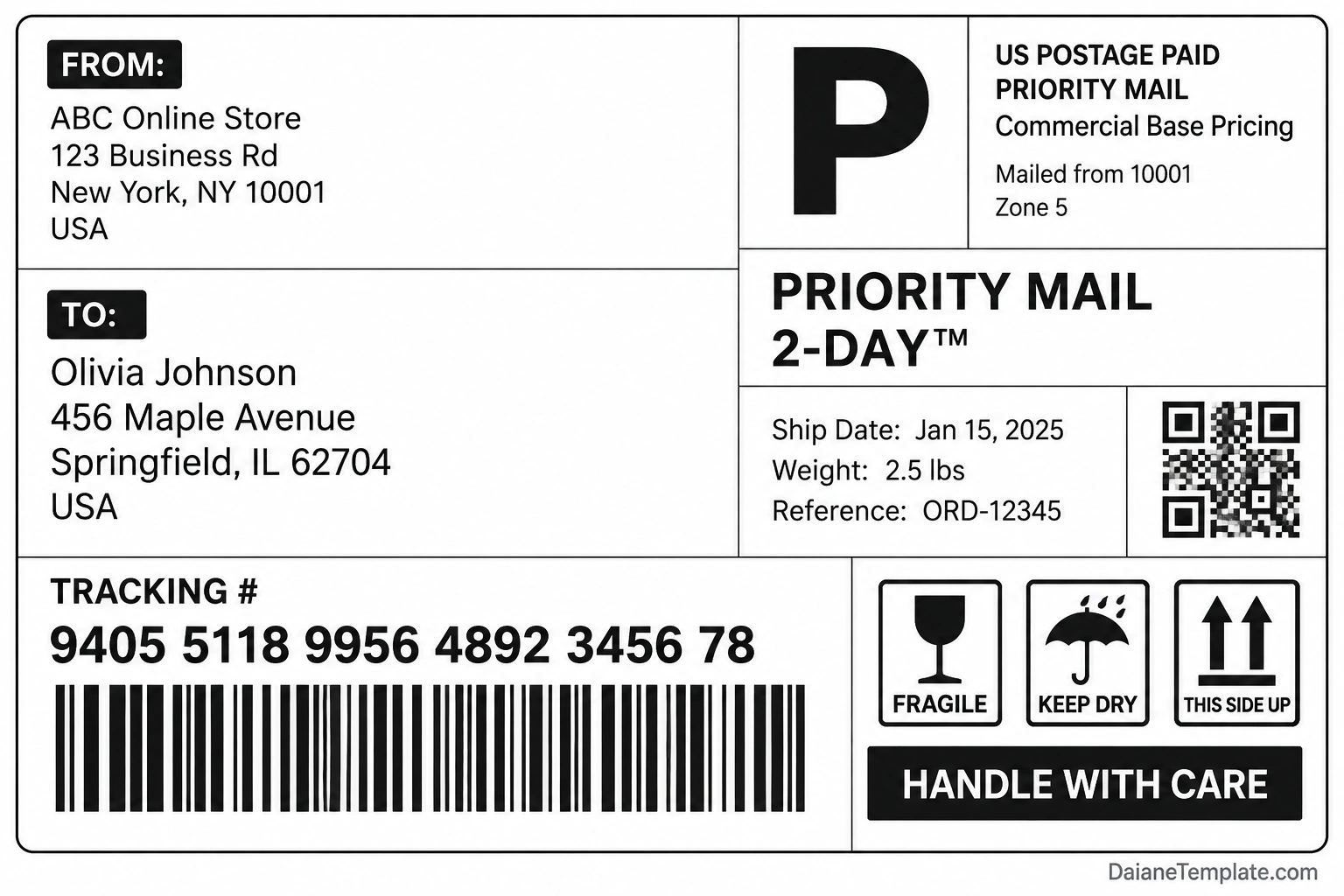
Use this sample as a visual reference when learning how shipping labels are organized. The example details and tracking elements are illustrative and should not be used as an actual postage label.
For a real shipment, purchase postage through your chosen carrier or an authorized shipping platform. Download the label generated for that shipment and keep the barcode, tracking number, and other required information unchanged.
How to Create a Shipping Label
The process for creating a shipping label depends on the carrier and shipping service. In many cases, you can prepare a label online and print it at home or at a shipping location.
Step 1: Confirm the Recipient’s Address
Check the recipient’s full name, street address, unit number, city, state, postal code, and country where applicable. Confirm that the address is complete before purchasing postage.
Step 2: Enter the Sender’s Information
Add the sender’s name and return address. For business shipments, use the appropriate company name and mailing address so the package can be identified if delivery problems occur.
Step 3: Enter Package Details
Provide the package’s dimensions and weight when requested. Accurate measurements help the carrier calculate the applicable postage and determine whether the package meets service requirements.
Step 4: Select a Shipping Service
Choose a service that fits your delivery timeline, budget, destination, and package requirements. Review available tracking, insurance, signature, and delivery options before confirming the shipment.
Step 5: Generate the Official Label
Complete the carrier’s shipping process and download the label it generates. Review the addresses and service details before printing.
Step 6: Print and Attach the Label
Print the label using the recommended paper size and printer settings. Attach it securely to a flat surface of the package, avoiding folds, seams, and edges that could interfere with scanning.
How to Print a Shipping Label Correctly
Correct printing helps preserve the readability of addresses and machine-readable elements. Before printing, review these practical considerations.
- Use the correct dimensions: Match the label size to the carrier’s requirements and the label format provided.
- Check print scaling: Avoid settings that shrink, stretch, or crop the label.
- Keep barcodes clear: Make sure barcode areas are sharp, unobstructed, and free from folds.
- Choose compatible paper: Use suitable plain paper or compatible adhesive shipping labels.
- Test the printer: Check print quality and alignment before preparing multiple packages.
- Attach the label securely: Use suitable adhesive or a label pouch without covering required information.
- Remove conflicting old labels: Cover or remove outdated labels and barcodes when reusing a box.
Shipping Label vs. Address Label
Shipping labels and address labels both display mailing information, but they serve different purposes.
- Address label: Primarily displays a sender’s or recipient’s mailing address and may be decorative or used for general correspondence.
- Shipping label: Usually contains the information required for a specific carrier shipment, including carrier-generated tracking and barcode elements when applicable.
An address label alone does not normally replace the official shipping label required for a tracked or prepaid shipment. Follow the carrier’s instructions and use the appropriate label for the service you purchase.
Common Shipping Label Mistakes to Avoid
Small errors can lead to delays, additional charges, or delivery problems. Check for these common issues before handing over a package.
- Incorrect recipient information: Verify the street address, apartment number, and postal code.
- Wrong package weight or dimensions: Measure and weigh the parcel accurately when required.
- Unreadable barcodes: Avoid low-quality printing, smudges, tape glare, or folds over barcode areas.
- Using an outdated label: Make sure the label corresponds to the correct shipment and postage purchase.
- Covering important information: Keep addresses, barcodes, and other required details visible.
- Ignoring carrier restrictions: Check rules for prohibited items, packaging, and special handling.
- Using a sample label for a real shipment: A visual template does not create postage or register a package with a carrier.
Shipping Label Tips for Small Businesses
Businesses that ship orders regularly can benefit from a consistent label preparation process. A few simple practices can reduce errors and improve fulfillment efficiency.
- Keep customer addresses organized in your order management system.
- Verify addresses before purchasing postage, especially for large orders.
- Use carrier-approved label generation tools or integrated shipping software.
- Match each label to the correct order and package.
- Keep tracking information linked to the relevant order record.
- Train staff to check label placement and barcode readability.
- Protect customer address information and restrict access to shipping records.
Frequently Asked Questions
What is a shipping label used for?
A shipping label identifies the sender, recipient, and shipment information needed to process a package. Depending on the carrier, it may include a tracking number, barcode, postage details, and the selected shipping service.
Can I create a shipping label at home?
Yes. Many carriers and shipping platforms allow you to enter shipment details online, purchase postage, and print the label at home. The available options depend on the carrier and service.
Can I use a printable shipping label template to ship a package?
A sample template is useful for learning about label layouts, but it does not provide valid postage or register a shipment. For an actual package, use the official label generated through the carrier or an authorized shipping platform.
Where should I place a shipping label on a package?
Place the label on a flat, visible surface where it can be scanned easily. Avoid seams, corners, folds, and areas where tape or packaging materials may obscure the barcode or address.
Do shipping labels need barcodes?
Many carrier-issued labels include barcodes for processing and tracking. The exact requirements depend on the carrier and service. Use the label generated for your shipment rather than creating a replacement barcode yourself.
What is the difference between a shipping label and a postage label?
The terms are sometimes used interchangeably. A shipping label commonly combines the destination information with shipment identification and service details, while a postage label emphasizes the postage associated with the shipment. The exact terminology varies by carrier.
Can I reuse a shipping label?
Do not assume that a shipping label can be reused. A label may be linked to a specific shipment and postage purchase. Follow the carrier’s rules and generate a new label when required.
Why is my shipping label not scanning?
A barcode may fail to scan because it is blurred, damaged, folded, obscured, or printed at the wrong scale. Reprint the official label if necessary and attach it to a smooth, unobstructed surface.
Conclusion
A shipping label is an essential part of preparing many packages for delivery. It provides destination details and shipment information that help carriers identify, process, and track parcels.
To prepare a reliable label, verify both addresses, enter accurate package details, use the correct carrier-generated shipping information, and print it clearly. A printable sample can help you understand the layout, while the official label from your carrier should be used for real shipments.
By following these steps, you can prepare packages more efficiently, reduce common labeling errors, and create a more consistent shipping process for personal use or your business.
Download: Shipping Label Template
