A punch card is a piece of stiff paper used to store information by creating holes in specific positions. Before modern computers, hard drives, and digital storage, punch cards provided a practical way to record, organize, sort, and process data. They became an important part of early automation, business data processing, textile manufacturing, census work, and computing.
The basic idea behind a punch card is simple: a hole or the absence of a hole represents information. Machines could read these patterns mechanically or electronically and use them to perform specific operations. This made punch cards an important step in the development of automated information processing and early computer programming.
Although punch cards are no longer used for everyday computing, they remain an important part of technology history. Understanding how they worked helps explain how people moved from manual record-keeping to automated data processing and eventually to modern digital computers.
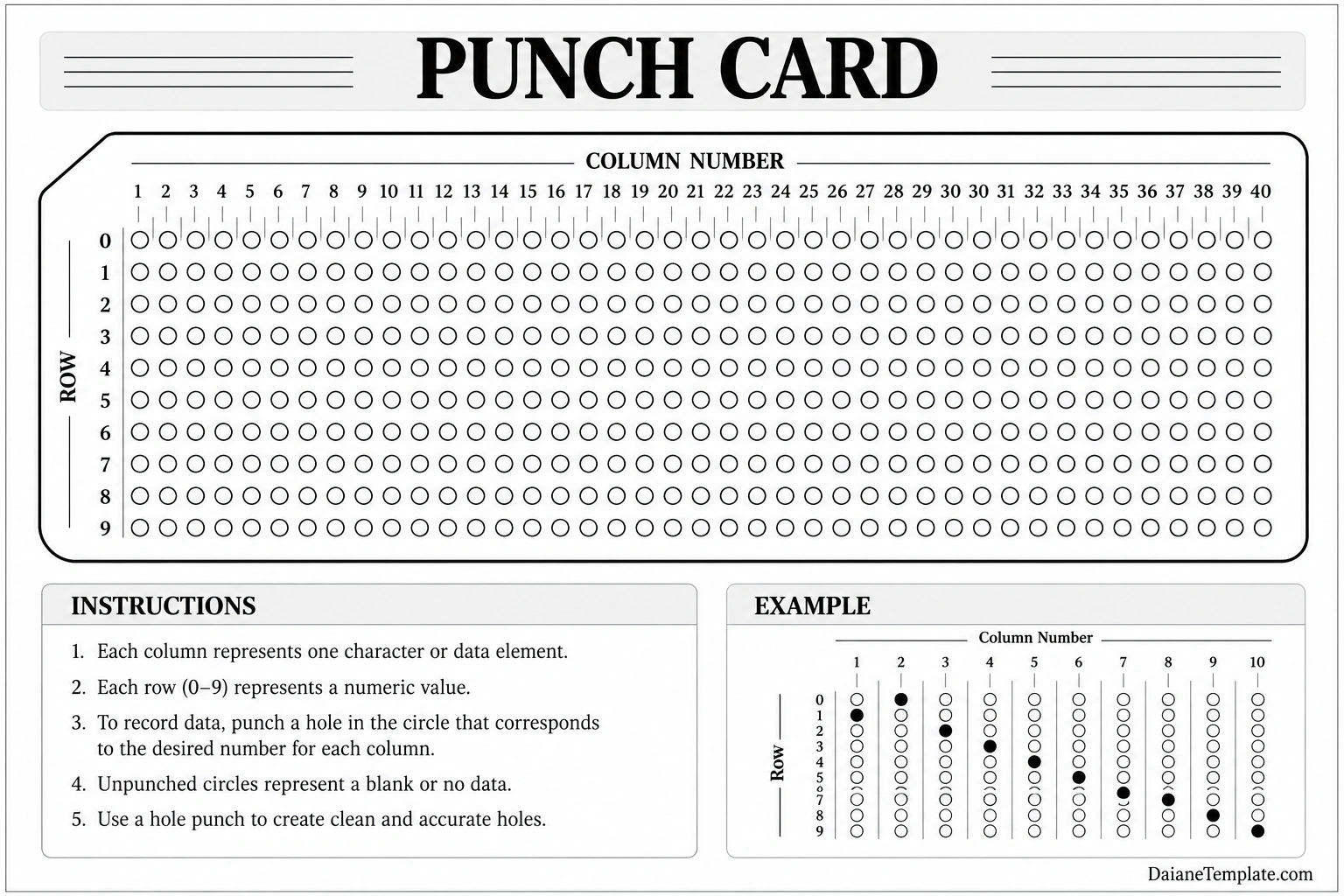
What Is a Punch Card?
A punch card is a paper card designed to hold information through a pattern of holes. Each hole has a specific position, and the position can represent a number, letter, instruction, or other type of data depending on the system being used.
Unlike modern digital files, a punch card does not store information as magnetic or electronic data. Instead, the physical arrangement of holes serves as the data representation. Specialized machines could detect these holes and convert the physical pattern into information that could be processed.
Punch cards were also called punched cards, perforated cards, or Hollerith cards in certain historical contexts. Different systems used different card sizes, hole arrangements, and coding methods.
How Does a Punch Card Work?
The operation of a punch card depends on a simple relationship between physical holes and encoded information. A blank card contains predetermined positions where holes can be punched. A punching machine creates holes according to the information being recorded.
Recording Information
When information needs to be stored, a card punching machine creates holes in selected positions. For example, one column might represent a character while a particular row represents a numerical value.
The resulting pattern becomes a physical representation of the original data. Once the card is punched, it can be stored, sorted, read, and processed by compatible equipment.
Reading the Card
A card reader detects which positions contain holes. Depending on the technology, the reader may use mechanical contacts, electrical detection, or optical methods to identify the pattern.
The machine then interprets the pattern according to the coding system used by that particular application. This allowed large numbers of cards to be processed much faster than manually entering the same information.
Sorting and Processing Cards
One of the major advantages of punch cards was their ability to support automated sorting. Machines could separate cards according to selected characteristics, making it easier to organize large collections of records.
Businesses and organizations could therefore use punch cards to manage repetitive data-processing tasks such as payroll, accounting, inventory records, and statistical calculations.
The History of Punch Cards
The history of punch cards stretches back well before the invention of electronic computers. Their development was closely connected with automated machinery and the need to control complex processes.
Punch Cards and Textile Looms
One of the earliest important uses of punched patterns appeared in textile manufacturing. The Jacquard loom, developed in the early nineteenth century, used punched cards to control the production of complex woven patterns.
The cards contained holes arranged according to the desired design. The loom could read these patterns and automatically determine which threads should be raised during weaving.
This concept demonstrated an important principle: physical instructions could be encoded and then read by a machine. That idea would later influence other forms of automated data processing.
Punch Cards for Census Data
Punch cards became especially important for processing large amounts of statistical information. In the late nineteenth century, Herman Hollerith developed a punched-card tabulating system that was used to process census data.
Instead of manually calculating every record, information could be represented by holes on cards. Machines could then count, sort, and tabulate the information much more efficiently.
This approach helped demonstrate the value of machine-readable data and became an important milestone in the history of information processing.
Punch Cards and Early Computers
As computing technology developed during the twentieth century, punch cards became an important method for entering programs and data into computers.
Early computers often had limited forms of direct interaction compared with modern systems. There were no graphical interfaces, keyboards, or large digital storage systems like those available today. Punch cards provided a practical way to prepare instructions and data in advance.
Programming with Punch Cards
Computer programmers could write instructions using a coding system and then have those instructions transferred to punch cards. A card deck could contain a sequence of instructions that a computer would read in order.
A single programming project could therefore consist of a large stack of cards. The order of the cards mattered, and dropping or rearranging them could cause serious problems during processing.
Business Data Processing
Punch cards were widely used for business applications because they could efficiently represent structured records. Organizations used them for tasks such as payroll, accounting, billing, inventory management, and customer records.
A payroll system, for example, could use cards to represent employee information and working data. Computers or tabulating machines could then process the records and produce calculations or reports.
Common Uses of Punch Cards
Punch cards were useful in many areas where large amounts of structured information needed to be recorded or processed.
- Textile manufacturing: Punch cards controlled patterns on automated looms.
- Census processing: Cards were used to record and tabulate population information.
- Payroll: Businesses used cards to store employee and payment information.
- Accounting: Financial records could be organized and processed using card-based systems.
- Inventory management: Businesses could maintain structured product and stock records.
- Scientific computing: Researchers used cards to enter data and computer programs.
- Early programming: Programmers prepared instructions on cards for compatible computers.
- Statistical processing: Large collections of numerical records could be sorted and analyzed.
What Information Could a Punch Card Store?
The amount and type of information stored on a punch card depended on its design and coding system. Some cards were designed primarily for numerical data, while others could represent letters, symbols, and computer instructions.
A typical punched-card system divided the card into columns and rows. Each position had a specific meaning. By combining different hole positions, a card could represent a character or data value.
For example, a card could contain employee information, an account number, a transaction record, or a computer instruction. A collection of cards could then represent a much larger dataset or program.
Advantages of Punch Cards
Although punch cards seem primitive compared with modern storage technology, they offered several important advantages for their time.
- Physical organization: Cards provided a tangible way to organize records.
- Machine readability: Compatible machines could automatically read the encoded information.
- Easy sorting: Cards could be mechanically sorted according to selected data fields.
- Batch processing: Large groups of records could be processed together.
- Simple duplication: Information could be transferred or reproduced using specialized equipment.
- Reduced manual calculation: Automated machines could perform repetitive processing tasks.
- Program storage: Early computers could receive instructions through punched-card decks.
Limitations of Punch Cards
Punch cards also had significant limitations. Their physical nature meant that they required careful handling and storage.
A damaged card could become difficult or impossible for a machine to read. A card that was accidentally placed in the wrong position could also affect the processing of an entire batch.
Another limitation was storage capacity. Modern storage devices can hold enormous quantities of information in a very small physical space. By comparison, punch cards required considerable room when large datasets or programs were stored.
Processing was also less flexible than modern digital systems. Changing information often required creating or replacing cards rather than simply editing a digital file.
Punch Card vs. Modern Digital Storage
The fundamental difference between a punch card and modern digital storage is how information is represented. A punch card stores information through a physical pattern of holes, while modern devices store data electronically, magnetically, or through other digital technologies.
Modern storage devices such as solid-state drives, memory cards, and cloud storage can store billions or even trillions of individual bits while providing fast access to information. Punch cards were much slower and less compact.
However, punch cards introduced an important concept that remains relevant today: information can be encoded in a standardized format that a machine can read and process automatically.
How to Understand a Punch Card Template
A punch card template can be useful for learning how punched-card encoding works. A template typically provides a structured grid containing columns and rows that represent possible hole positions.
Identify the Columns
Start by looking at the numbered columns across the card. Each column can represent a character, data field, or position within an encoded record, depending on the system.
Identify the Rows
The rows indicate possible values or hole positions. In a simple educational punch card template, rows may be labeled with numbers from 0 through 9.
Mark the Appropriate Positions
To simulate punched information, mark or punch the appropriate positions within the grid. A series of selected positions can demonstrate how different data values are represented physically.
For educational purposes, a printable punch card template can make the concept easier to understand because the relationship between data and physical holes becomes visible.
Tips for Using a Punch Card Template
If you are using a punch card template for education, historical research, or a classroom activity, a few simple practices can make the exercise more effective.
- Use a clear coding system before marking the card.
- Keep the columns in their original order.
- Label important rows and columns clearly.
- Use consistent symbols when demonstrating punched and unpunched positions.
- Keep an example card alongside the blank template for comparison.
- Explain that different historical systems used different coding standards.
- Store completed cards flat to prevent damage or bending.
Why Are Punch Cards Still Important?
Punch cards are important because they represent one of the early practical methods of making information machine-readable. They connected physical records with automated processing and helped establish ideas that later became fundamental to computing.
The technology also demonstrates that computing did not begin with modern electronic devices. Long before smartphones, personal computers, and cloud services, engineers were already developing ways to encode instructions and information so that machines could process them automatically.
Studying punch cards can therefore provide useful historical context for subjects such as computer science, information technology, automation, data processing, and the history of programming.
Frequently Asked Questions About Punch Cards
What is a punch card used for?
A punch card is used to represent information through holes punched into specific positions. Historically, punch cards were used for textile automation, census processing, payroll, accounting, statistical work, data storage, and early computer programming.
Who invented the punch card?
Punched cards were developed for several purposes over time. Joseph Marie Jacquard used punched cards to control textile patterns in the early nineteenth century, while Herman Hollerith developed a punched-card tabulating system for processing census data in the late nineteenth century.
How did punch cards store data?
Punch cards stored data through patterns of holes. The location of each hole had a defined meaning within a particular coding system. Machines could detect the holes and translate the physical pattern into data or instructions.
Were punch cards used to program computers?
Yes. Punch cards were widely used to enter programs and data into many early computers. Programmers could create a sequence of punched cards containing instructions that a computer would read and execute.
Are punch cards still used today?
Punch cards are largely obsolete for modern computing and data storage. Digital storage technologies are faster, smaller, more reliable, and capable of holding vastly more information. Punch cards are now mainly of historical, educational, or collectible interest.
What is a punch card template?
A punch card template is a printable representation of a punched-card layout. It can show columns, rows, and hole positions and can be used to demonstrate how information was historically encoded on cards.
Conclusion
The punch card was a simple but influential technology that helped transform information from something handled entirely by people into something machines could automatically read and process. From controlling textile looms to processing census records, managing business data, and programming early computers, punch cards played an important role in the development of automation and computing.
Although modern digital storage has replaced punch cards for practical applications, their underlying idea remains historically significant. A punch card demonstrates how structured information can be encoded into a machine-readable format, making it an important example of the evolution from mechanical automation to modern computing.
Download: Punch Card Template
