A pie chart is a simple and effective way to visualize data and show how individual categories contribute to a whole. By dividing a circle into slices, it helps readers compare proportions, understand percentages, and identify the largest or smallest categories at a glance.
From business reports and school assignments to household budgets and survey results, a pie chart can turn a list of numbers into an easy-to-understand visual summary. Instead of studying a long table, readers can quickly see how the data is distributed across different categories.
Whether you need a pie chart template for a presentation, a printable worksheet, or a data analysis project, choosing the right layout makes your information easier to communicate. This guide explains what a pie chart is, when to use one, how to calculate percentages, and how to create a clear and professional chart.
What Is a Pie Chart?
A pie chart is a circular graph divided into slices, with each slice representing a category’s share of the total. The size of each slice corresponds to the value or percentage assigned to that category.
For example, a household budget pie chart might show how monthly spending is divided among housing, food, transportation, utilities, healthcare, and entertainment. Larger slices represent categories that account for a greater share of total expenses.
A complete pie chart represents 100% of the dataset. Each category contributes to the whole, making this chart type especially useful when the main goal is to show relative proportions rather than changes over time.
Pie Chart Template: Sample and Visual Example
A pie chart template provides a structured way to display category names, percentages, and a visual breakdown of the total. The following sample illustrates how a household expense dataset can be presented using colored slices and a matching legend.
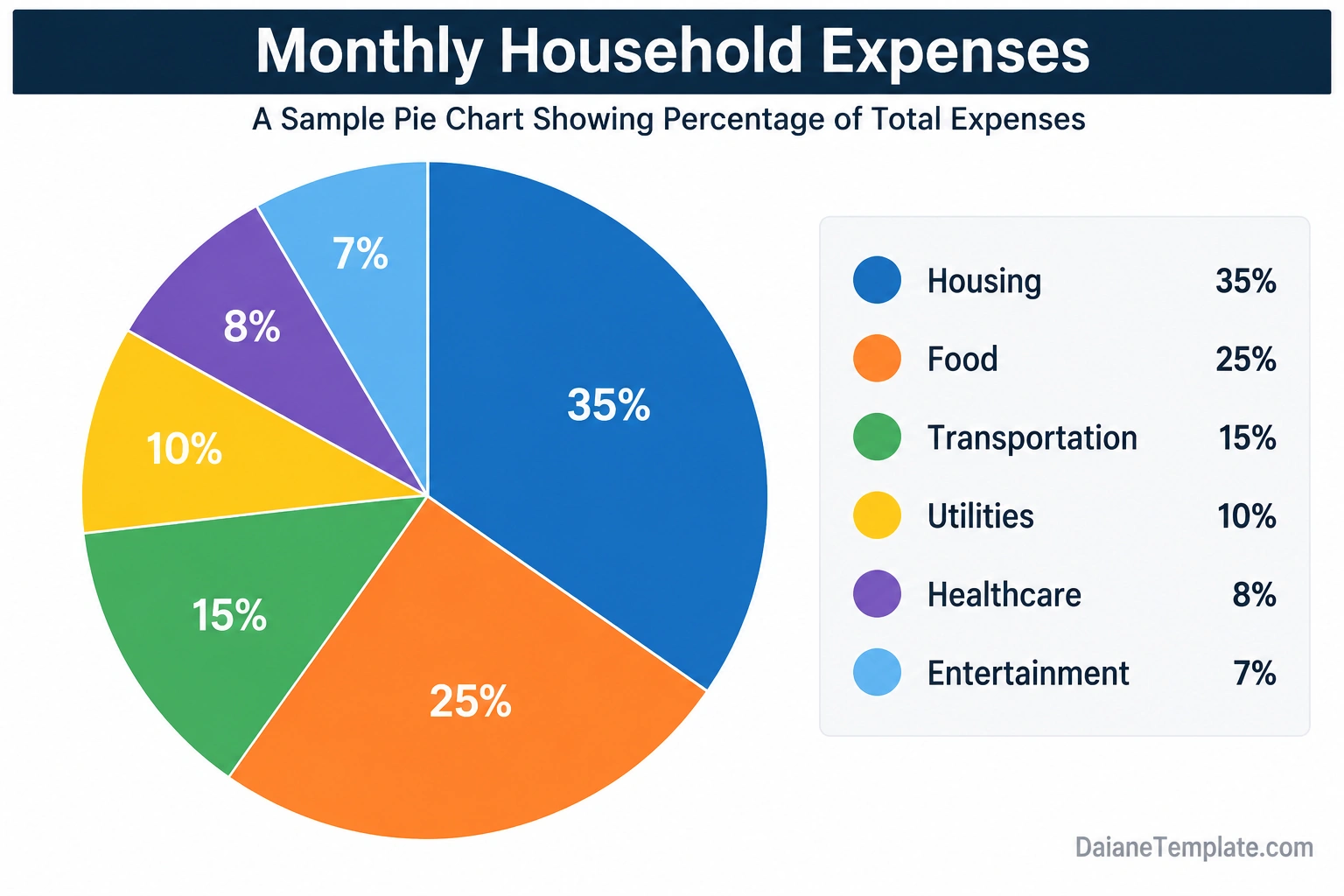
In this example, housing accounts for the largest share at 35%, followed by food at 25% and transportation at 15%. Utilities represent 10%, healthcare accounts for 8%, and entertainment makes up the remaining 7%.
Together, the six categories add up to 100%. This makes the example useful for learning how a pie chart represents a complete dataset. The figures are illustrative and are not intended to represent a typical household budget.
Why Use a Pie Chart?
A well-designed pie chart can make numerical information easier to understand, especially when readers need to see how different categories contribute to a total.
1. Shows Proportions Clearly
The circular layout helps readers understand the relationship between each category and the whole. A larger slice immediately indicates a larger share of the total.
2. Makes Percentages Easier to Interpret
Adding percentage labels allows readers to understand each category’s contribution without calculating the values themselves. This can be useful in reports, surveys, and budget summaries.
3. Highlights the Largest and Smallest Categories
When the slices are clearly labeled, it becomes easier to identify which categories account for the greatest or smallest portions. This can support discussions about spending, resource allocation, and survey results.
4. Simplifies Presentations
A pie chart can summarize a dataset in a compact visual format. It works well on presentation slides, dashboards, reports, classroom materials, and printable data worksheets.
5. Makes Data More Accessible
For audiences who may not be comfortable interpreting numerical tables, a simple chart can provide a useful starting point. Clear labels, readable text, and appropriate color choices make the information easier to follow.
When Should You Use a Pie Chart?
A pie chart works best when you want to show how a set of categories divides a single total. The data should represent meaningful parts of the same whole.
Business Reports
Businesses can use pie charts to illustrate revenue shares, market segments, departmental budgets, or the distribution of expenses. The categories should be clearly defined and measured using a consistent basis.
Personal Budgeting
A household budget pie chart can show the percentage of spending allocated to rent or mortgage payments, food, transportation, utilities, savings, and other expenses. This can help users understand where their money goes.
School Projects
Students can use pie charts to present survey findings, classroom preferences, reading habits, or other categorical data. A clear legend and accurate percentages help make the project easier to understand.
Survey Results
Pie charts can summarize responses to a single-choice survey question when the response categories are mutually exclusive and collectively account for the full set of responses being analyzed.
Resource Allocation
Organizations may use pie charts to communicate how a budget, project workload, or resource pool is distributed among several categories. For more detailed comparisons, a bar chart may be a better choice.
How to Calculate Pie Chart Percentages
To create an accurate pie chart, calculate the percentage represented by each category. The percentage is the category’s value divided by the total value, multiplied by 100.
Percentage formula:
Category Percentage = (Category Value / Total Value) × 100
For example, suppose a sample monthly budget totals $4,000 and housing costs $1,400. The housing percentage is calculated as follows:
- Category value: $1,400
- Total budget: $4,000
- Calculation: ($1,400 / $4,000) × 100 = 35%
Housing therefore represents 35% of the total budget.
Calculate the Slice Angle
If you are drawing a pie chart manually, you can calculate each slice’s angle using the category percentage.
Slice Angle = (Category Value / Total Value) × 360°
For the housing example, the angle is 35% of 360°, which equals 126°. This is the angle occupied by the housing slice.
Repeat the calculation for each category. The slice angles should add up to 360°, allowing for minor rounding differences when working with rounded percentages.
How to Create a Pie Chart Step by Step
You can create a pie chart using spreadsheet software, presentation tools, online chart makers, or a printable worksheet. Follow these steps to keep the chart accurate and readable.
Step 1: Collect Your Data
Gather the numerical values for each category. Make sure the data refers to the same total, time period, population, or measurement basis.
Step 2: Organize the Categories
List each category alongside its value. Avoid overlapping categories because each slice should represent a distinct part of the total.
Step 3: Calculate the Total
Add the category values together to determine the overall total. Check the arithmetic before calculating percentages.
Step 4: Calculate Each Percentage
Divide each category value by the total and multiply by 100. Check that the percentages add up to approximately 100%, allowing for rounding.
Step 5: Choose Your Chart Tool
In spreadsheet software, enter the categories and values into a table, select the data, and choose the pie chart option. Most chart tools can calculate slice sizes automatically.
If you are using a printable pie chart worksheet, you can record the values and percentages first, then draw or color the corresponding slices using a protractor or a suitable charting method.
Step 6: Add Labels and a Legend
Give the chart a descriptive title. Label the slices with category names or percentages, and add a legend if the chart uses colors to identify categories.
Step 7: Review the Final Chart
Check that the labels match the correct slices, the values are accurate, and the chart is easy to read. If several categories are very small, consider grouping them only when doing so is analytically appropriate and clearly disclosed.
Best Practices for Designing a Pie Chart
Good chart design helps readers understand the data without unnecessary effort. Use these practices when preparing a pie chart for print or digital use.
- Keep the number of slices manageable: A small number of categories is easier to compare than a chart with many thin slices.
- Use contrasting colors: Choose colors that distinguish categories clearly and remain readable in the intended format.
- Label slices carefully: Include category names or percentages when doing so improves comprehension.
- Use a descriptive title: Explain what the chart represents and identify the relevant period or dataset.
- Check the total: Make sure the categories represent the intended whole and that percentages are calculated correctly.
- Avoid misleading effects: Do not distort the slice sizes or use unnecessary 3D effects that make comparisons harder.
- Consider accessibility: Use direct labels or patterns where appropriate so the chart does not rely on color alone.
- Keep the background simple: Avoid decorative elements that compete with the data.
Pie Chart vs. Bar Chart: Which Is Better?
A pie chart and a bar chart can both communicate categorical data, but they serve different purposes.
A pie chart is useful when you want to show each category’s share of a complete total. A bar chart is often better when you need to compare values precisely, include many categories, or display differences between groups.
For example, a pie chart can show the percentage of a household budget allocated to each expense category. A bar chart may be more effective for comparing monthly spending across several months or comparing the same expense category across multiple households.
Choose the chart type that best matches the question you want the data to answer. The goal is not to use the most decorative chart, but to present the information accurately and clearly.
Common Pie Chart Mistakes to Avoid
Even a simple chart can become misleading if the data or design is handled incorrectly. Watch out for these common problems.
- Using categories that do not form a whole: Make sure the values represent the same defined total.
- Incorrect percentages: Recheck the total and calculation method.
- Too many categories: Consider a bar chart when the slices become difficult to distinguish.
- Missing labels: Include enough information for readers to identify each category.
- Inconsistent data: Avoid mixing values from different time periods or measurement bases.
- Misleading visual effects: Keep the slice sizes proportional to the underlying values.
- Unclear rounding: Explain when displayed percentages have been rounded and may not sum to exactly 100%.
Frequently Asked Questions About Pie Charts
What is the main purpose of a pie chart?
The main purpose of a pie chart is to show how different categories contribute to a whole. It makes relative proportions and percentages easier to understand visually.
How do you calculate percentages for a pie chart?
Divide the value of each category by the total value, then multiply by 100. For example, a category worth 25 out of a total of 100 represents 25% of the pie chart.
Do pie chart percentages have to add up to 100%?
Yes. The underlying category percentages should total 100% when the categories account for the entire dataset. Displayed values may differ slightly because of rounding.
How many categories should a pie chart have?
There is no universal limit, but a pie chart is generally easier to read when it contains only a few categories. If there are many small slices, a bar chart may communicate the information more clearly.
Can I make a pie chart in Excel or Google Sheets?
Yes. Enter your category names and values into a table, select the data, and insert a pie chart. You can then customize the title, labels, colors, and legend.
What is the difference between a pie chart and a doughnut chart?
A pie chart is a full circle divided into slices. A doughnut chart uses a similar structure but has a blank center. Both can show proportions, although the best choice depends on the layout and how readers will interpret the data.
When should I avoid using a pie chart?
Avoid pie charts when the categories do not represent parts of the same whole, when precise comparisons are essential, or when the dataset contains too many categories. A bar chart or another visualization may be more suitable.
Can I use a pie chart template for a school project?
Yes. A pie chart template can help students organize data, calculate percentages, and present survey results or other categorical information. Always check the calculations and label the categories clearly.
Conclusion
A pie chart is a useful visualization for showing how individual categories contribute to a complete dataset. By presenting values as proportional slices, it helps readers compare percentages and identify the largest and smallest portions of a total.
Use a pie chart template to organize your data, calculate percentages, and create a clear visual summary for reports, budgets, presentations, or school projects. Choose meaningful categories, verify the calculations, and keep labels and colors easy to understand.
When the data contains too many categories or requires precise comparisons, consider using a bar chart instead. Selecting the right visualization will help your audience understand the information more quickly and accurately.
Download: Pie Chart Template
