A payment receipt is a written record confirming that a customer has paid for goods or services. It helps customers document their expenses and gives businesses a reliable record of transactions for bookkeeping, accounting, and customer service. Whether you run a small business, work as a freelancer, or sell products online, issuing a clear payment receipt helps keep financial records organized and professional.
A well-prepared payment receipt identifies the seller, the customer, the amount paid, the payment date, and the goods or services covered by the transaction. Depending on the situation, it may also include a receipt number, payment method, tax details, and outstanding balance. These details make it easier to verify payments, resolve billing questions, and maintain accurate records.
In this guide, you will learn what a payment receipt is, which details it should contain, how it differs from an invoice, and how to create one using a printable payment receipt template. You will also find practical tips and answers to common questions about issuing and keeping receipts.
What Is a Payment Receipt?
A payment receipt is a document provided by a seller, service provider, landlord, freelancer, or other recipient to confirm that payment has been received. It serves as evidence of a transaction and records how much was paid and what the payment covered.
For example, a freelance designer may issue a receipt after receiving payment for a completed project. A retailer may provide a receipt after a customer purchases merchandise, while a service business may issue one after receiving a deposit or final payment.
A payment receipt can be printed on paper or delivered electronically through email, accounting software, or a point-of-sale system. Regardless of its format, it should contain accurate information and clearly state whether the payment settles the full amount or only part of the balance.
A receipt helps document a transaction, but its legal, tax, or evidentiary significance depends on the circumstances and applicable rules. Businesses should follow the recordkeeping and receipt requirements relevant to their location and industry.
Why Is a Payment Receipt Important?
Payment receipts benefit both customers and businesses by creating a clear record of money received. They can reduce confusion, support financial administration, and make it easier to verify past transactions.
- Confirms payment: A receipt records that the seller or service provider received a specified amount.
- Supports bookkeeping: Businesses can use receipts to reconcile transactions and maintain organized financial records.
- Documents customer expenses: Customers may keep receipts for budgeting, expense reports, or eligible tax records.
- Helps with returns and warranties: Transaction details may help establish when an item was purchased and how much was paid, subject to the applicable policy.
- Improves payment tracking: Receipt numbers and transaction references help businesses locate records quickly.
- Reduces disputes: A detailed receipt can clarify the amount received, payment date, and purpose of the transaction.
- Supports financial reporting: Receipts can help businesses compare recorded payments with bank deposits, cash records, and accounting entries.
Receipts are particularly useful when a business handles frequent transactions, installment payments, deposits, or payments from multiple customers. Consistent documentation makes financial records easier to review.
What Should a Payment Receipt Include?
The information on a payment receipt depends on the type of transaction. However, including the following details makes most receipts easier to understand and use.
1. Business or Seller Information
Include the business name or the name of the person receiving payment. You may also include a business address, phone number, email address, or other contact details so the customer can ask questions about the transaction.
Use the appropriate legal or registered business information when required by local rules. Certain industries may have additional identification or documentation requirements.
2. Receipt Number and Date
Assign a unique receipt number when practical. A numbering system such as PR-1001, PR-1002, and PR-1003 can help you find records and avoid confusion between transactions.
Record the date the payment was received. If the transaction and payment occur on different dates, make the distinction clear when it matters for your records.
3. Customer Information
Include the customer’s name and, when appropriate, their business name or contact information. For routine retail transactions, a customer’s full address may not be necessary. Collect only the information needed for the transaction and your recordkeeping obligations.
4. Description of Goods or Services
Describe the products or services covered by the payment. For multiple items, use an itemized list that includes the description, quantity, unit price, and amount for each line.
A specific description is more useful than a vague entry such as “services.” For example, “Website design deposit” or “Office cleaning service for October” gives both parties a clearer record of what was paid for.
5. Amount Paid and Payment Method
Clearly state the amount received and the currency. If relevant, show the subtotal, applicable taxes, discounts, fees, and total paid separately.
You may also identify the payment method, such as cash, bank transfer, check, or an electronic payment service. For digital payments, a transaction reference can help reconcile the receipt with the payment record. Avoid printing full payment card numbers or other sensitive financial information.
6. Payment Status and Outstanding Balance
State whether the payment is complete or partial. If the customer has paid a deposit or installment, record the amount received and the remaining balance when applicable.
For example, if a customer owes $800 and pays a $300 deposit, the receipt should identify the $300 received and may note the remaining $500 due. This prevents the receipt from being mistaken for proof that the entire balance has been paid.
7. Notes and Authorization
Add relevant notes, such as a project reference, purchase order number, warranty reference, or installment details. A signature or the name of the person receiving payment may also be useful for certain transactions, although it is not necessary for every receipt.
Printable Payment Receipt Template
A printable payment receipt template provides a consistent layout for recording customer information, payment details, item descriptions, and the total amount received. It is useful for small businesses, independent contractors, service providers, and individuals who need a straightforward way to document payments.
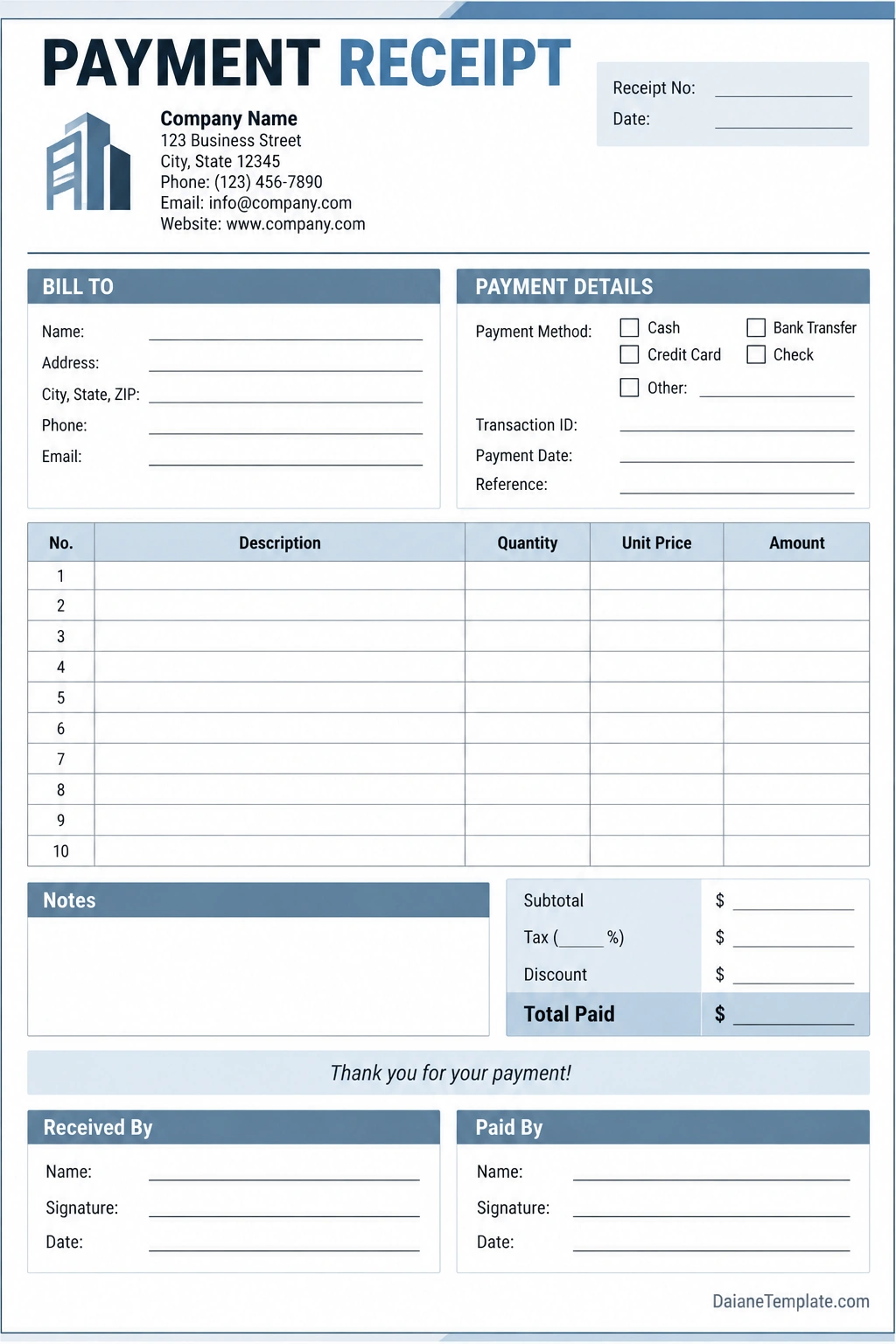
To complete the template, enter the relevant information for the transaction and check the calculations before issuing the receipt.
- Business details: Enter the seller or service provider’s name and contact information.
- Receipt information: Add a unique receipt number and the payment date.
- Customer details: Record the customer’s name and any necessary contact information.
- Payment details: Identify the payment method and transaction reference when relevant.
- Itemized charges: List products or services, quantities, unit prices, and line totals.
- Total calculation: Include applicable taxes, discounts, and the total amount received.
- Notes: Record whether the payment is a deposit, installment, or final payment.
- Confirmation: Add the receiver’s name or signature if appropriate for the transaction.
Before printing or sending the receipt, verify that the total matches the payment actually received. Save a copy for your business records and provide the customer with their copy.
How to Create a Payment Receipt Step by Step
Step 1: Choose a Receipt Format
Decide whether you need a printed receipt, a digital PDF, an email confirmation, or a receipt generated by accounting or point-of-sale software. Choose a format that fits your transaction volume and recordkeeping process.
Step 2: Enter the Transaction Details
Record the receipt number, date, customer information, and description of the goods or services. Use a consistent format so that receipts are easy to read and search later.
Step 3: Calculate the Amount
List the relevant items and calculate their totals. Apply discounts, taxes, or other charges where appropriate, and clearly show the amount paid. If the payment covers only part of the balance, identify it as a partial payment.
Step 4: Confirm the Payment
Issue a receipt only after confirming that payment has been received or processed according to your business procedures. For bank transfers or electronic payments, check the transaction status rather than relying solely on a screenshot or payment claim from the customer.
Step 5: Provide the Receipt to the Customer
Give the customer a printed copy or send the receipt electronically. Make sure the customer can read the transaction details and contact the business if any information needs correction.
Step 6: Save a Copy for Your Records
Store the receipt with the related invoice, order, payment confirmation, or accounting entry. Use a consistent filing system and follow the retention requirements that apply to your business.
Payment Receipt vs. Invoice: What Is the Difference?
A payment receipt and an invoice serve different purposes, even though they may contain similar transaction details.
Payment Receipt
A payment receipt confirms that a payment has been received. It is generally issued after the customer pays all or part of the amount due. The receipt records the amount received and what the payment covers.
Invoice
An invoice requests payment for goods or services. It usually identifies the amount owed, the items or services supplied, payment terms, and the due date. An invoice may be issued before payment is received.
For example, a contractor may send an invoice for $1,200 before beginning a project. When the customer pays a $400 deposit, the contractor can issue a payment receipt confirming the deposit and showing the remaining balance if appropriate.
Businesses may use both documents for the same transaction: the invoice explains what is owed, while the receipt documents the payment received. Some accounting systems combine related information, but the payment status should remain clear.
Best Practices for Managing Payment Receipts
A reliable receipt process can improve accuracy and make it easier to answer customer questions. Use the following practices to keep transaction records organized.
- Use sequential receipt numbers: A consistent numbering system helps identify missing or duplicate records.
- Keep descriptions specific: Describe the goods, services, or installment covered by the payment.
- Verify calculations: Check item totals, discounts, taxes, and the amount received.
- Separate partial and full payments: Make the payment status and remaining balance clear.
- Store receipts securely: Limit access to records that contain customer or transaction information.
- Use consistent formats: A standard template makes receipts easier to read and process.
- Reconcile payments regularly: Compare receipt records with cash logs, bank deposits, and accounting records.
- Follow retention rules: Keep receipts for the period required by applicable tax, accounting, or business rules.
- Protect sensitive data: Avoid including unnecessary personal or financial information.
Common Payment Receipt Mistakes to Avoid
Small errors can create confusion for customers and make accounting more difficult. Review each receipt before sending it.
- Recording the wrong amount: Verify that the receipt matches the payment received.
- Leaving out the payment date: The date helps identify the transaction and reconcile records.
- Using vague descriptions: Identify the products, services, or invoice covered by the payment.
- Failing to identify partial payments: State whether the receipt covers a deposit, installment, or full balance.
- Reusing receipt numbers: Duplicate identifiers can make records harder to track.
- Issuing a receipt before confirming payment: Check the actual transaction status before confirming receipt of funds.
- Ignoring record security: Store customer information securely and collect only necessary details.
- Confusing a receipt with an invoice: Make it clear whether the document confirms payment or requests payment.
Frequently Asked Questions About Payment Receipts
What is the main purpose of a payment receipt?
The main purpose is to confirm that a seller or service provider has received payment. It records important transaction details and can help customers and businesses maintain accurate financial records.
Is a payment receipt proof of payment?
A receipt is generally evidence that the issuer acknowledges receiving the stated amount. Its evidentiary value depends on the circumstances and applicable rules. For electronic payments, a receipt may be supported by a transaction confirmation or account record.
Can I create a payment receipt in Word or Excel?
Yes. You can create a payment receipt using Word, Excel, a printable template, or accounting software. Choose a format that makes transaction details easy to read and supports consistent recordkeeping.
Should a payment receipt include tax?
If tax applies to the transaction, show it separately when required or useful for the customer’s records. Tax receipt requirements vary by location and transaction type, so businesses should follow the rules that apply to them.
Can I issue a receipt for a partial payment?
Yes. Record the amount received and identify it as a partial payment, deposit, or installment. You can also state the original amount due and remaining balance so both parties understand the payment status.
What is the difference between a payment receipt and a sales receipt?
The terms can overlap. A sales receipt commonly documents a retail sale and payment, while a payment receipt may confirm payment for a wider range of transactions, including services, deposits, rent, or installment payments. The exact usage depends on the business and its accounting process.
Does a payment receipt need a signature?
Not always. Many digital and retail receipts do not require a handwritten signature. A signature or receiver’s name may be useful for certain transactions, depending on the business process and applicable requirements.
How long should I keep payment receipts?
The required retention period depends on local tax, accounting, and business rules. Businesses should confirm the relevant requirements and keep receipts securely for the appropriate period. Customers should retain receipts for as long as they may be needed for returns, warranties, expense claims, or tax documentation.
Conclusion
A payment receipt provides a clear record that money has been received for goods or services. By including the receipt number, payment date, customer details, transaction description, amount paid, and payment status, you can create a useful document for both the customer and the business.
Use a payment receipt template to standardize your process, verify each transaction before issuing confirmation, and store copies securely for accounting and customer service. Keep the information accurate and follow the recordkeeping and tax requirements that apply to your location and business.
A consistent receipt process makes transactions easier to verify, supports organized financial records, and helps build trust between businesses and customers.
Download: Payment Receipt Template
