A process map is a visual representation of a workflow that shows how tasks, decisions, people, and activities move from the beginning of a process to its final outcome. By presenting the steps in a clear sequence, a process map makes complex workflows easier to understand, analyze, communicate, and improve.
Businesses and organizations can use process mapping to document current procedures, clarify responsibilities, identify bottlenecks, reduce unnecessary steps, and create more consistent ways of working. A well-designed process map can also help employees understand how their tasks connect to the work performed by other teams.
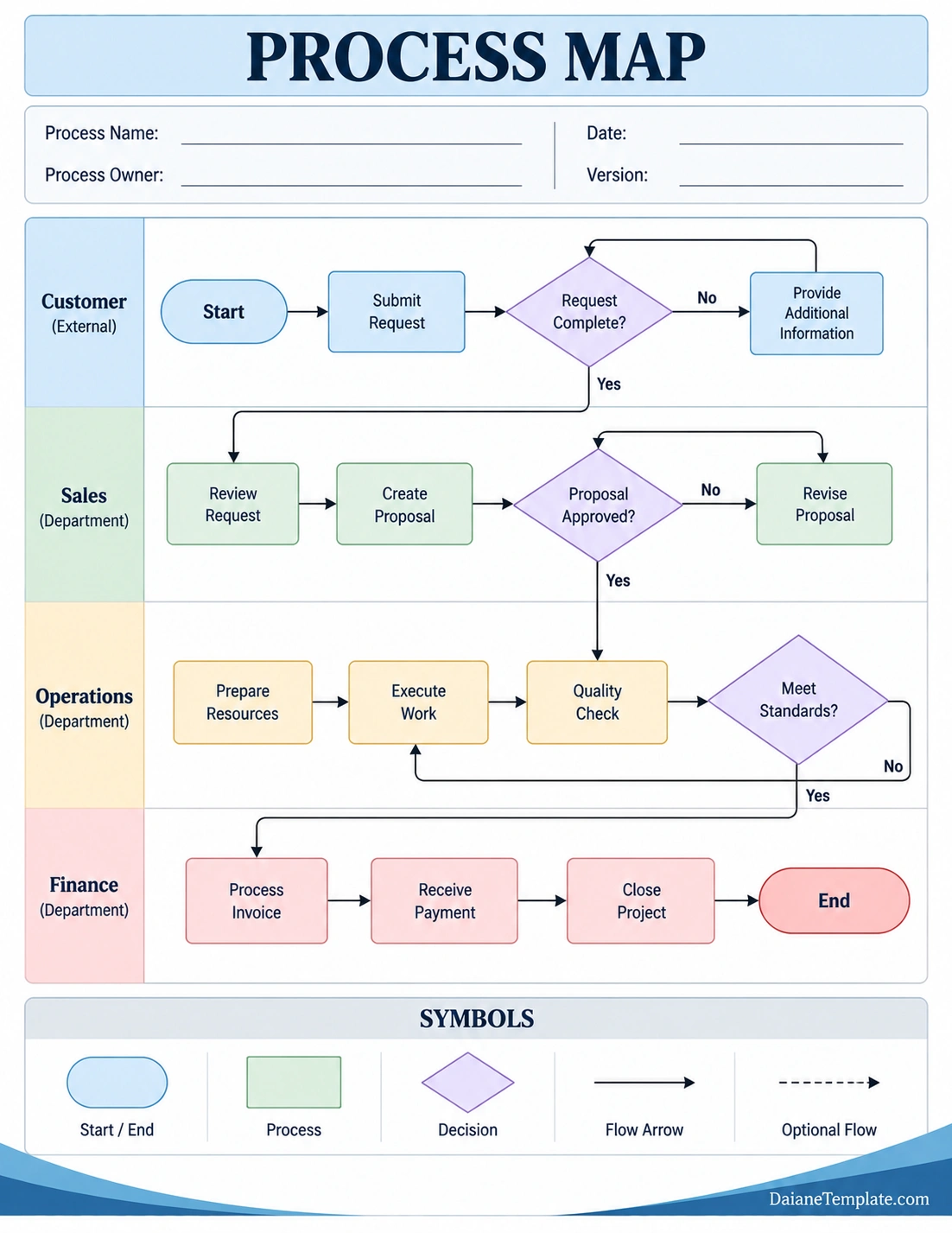
What Is a Process Map?
A process map is a visual diagram that illustrates the sequence of activities required to complete a process. It can show simple workflows with only a few steps or complex processes involving multiple departments, decisions, approvals, and outcomes.
Instead of describing a workflow using paragraphs of text, a process map uses visual elements such as boxes, arrows, decision points, and swim lanes. Each element represents part of the workflow and shows how one activity connects to another.
For example, a customer request process might begin when a customer submits a request, continue through review and approval, move to operations for execution, and finish after the final result is delivered. A process map can display this entire sequence on a single page.
Why Is Process Mapping Important?
Processes can become difficult to understand when responsibilities are spread across different people or departments. A process map creates a shared visual reference that makes the workflow easier to examine.
- Improves understanding: Employees can see how individual tasks fit into the overall workflow.
- Clarifies responsibilities: Process maps can show which person, team, or department handles each activity.
- Identifies bottlenecks: Delays and unnecessary approval points become easier to recognize.
- Reveals redundancies: Repeated or duplicated activities can be identified and reviewed.
- Supports process improvement: Teams can use the visual workflow to identify opportunities for streamlining.
- Improves communication: A shared diagram can make discussions about processes more productive.
- Supports training: New employees can use documented workflows to understand how work is performed.
- Creates process documentation: A completed map provides a visual record of an established procedure.
What Does a Process Map Include?
The exact components of a process map depend on the type and complexity of the workflow. However, several elements are commonly used to make a process easy to follow.
Process Steps
Process steps represent the individual activities required to complete the workflow. Each step should use a short and descriptive phrase, such as Review Request, Create Proposal, or Process Invoice.
Flow Arrows
Arrows show the direction of the workflow. They connect activities and help readers understand which step happens next.
Decision Points
Decision points represent questions or conditions that determine what happens next. A decision may create two or more paths, such as an approved or rejected request.
Start and End Points
Start and end symbols identify where the process begins and where it finishes. Clearly defining these points helps prevent confusion about the scope of the workflow.
Swim Lanes
Swim lanes divide a process map according to departments, roles, teams, or other responsible parties. They are particularly useful when a workflow moves between several groups.
Process Notes
Additional notes can explain important requirements, exceptions, documents, systems, or other information associated with a particular step.
Common Types of Process Maps
There are several ways to visualize a workflow. The best format depends on what you want the map to communicate.
Basic Flowchart
A basic flowchart shows a sequence of steps using standard shapes and arrows. It works well for straightforward processes with limited complexity.
Swim Lane Process Map
A swim lane process map organizes activities by role or department. This format makes handoffs between teams especially easy to identify.
Detailed Process Map
A detailed process map provides additional information about inputs, outputs, decisions, systems, documents, and responsibilities. It can be useful for complex operational workflows.
High-Level Process Map
A high-level process map focuses on the major stages rather than every individual task. It is useful for communicating an overview of a workflow to managers, stakeholders, or new employees.
Value Stream Map
A value stream map focuses on how materials, information, and activities move through a process while helping teams identify activities that create value and areas that may contribute to waste or delays.
How to Create a Process Map
Creating a process map becomes easier when you begin with the actual workflow rather than immediately drawing shapes. First understand what happens, who performs each activity, and how decisions affect the next step.
1. Define the Process
Determine exactly what process you want to map. Define where it starts and where it ends. Avoid trying to document an entire organization in one diagram.
2. Identify the Participants
List the people, teams, departments, customers, systems, or other parties involved. This information can later be used to create swim lanes or assign responsibilities.
3. List the Main Steps
Write down the activities in the order they occur. At this stage, focus on capturing the actual workflow rather than trying to make it perfect.
4. Identify Decisions
Look for points where the process can follow different paths. Questions such as Is the request complete? or Was the proposal approved? may create separate workflow branches.
5. Connect the Steps
Use arrows to show the direction of the process. Make sure the sequence is easy to follow from start to finish.
6. Assign Responsibilities
Identify who performs each activity. If multiple teams are involved, use swim lanes to make responsibility and handoffs visible.
7. Review the Map With the Team
Ask the people who actually perform the work to review the diagram. They may identify steps, exceptions, approvals, or dependencies that were missed during the initial mapping process.
8. Look for Improvement Opportunities
Once the current process is visible, look for unnecessary steps, repeated work, long approval cycles, unclear responsibilities, and other opportunities for improvement.
How to Use a Process Map to Improve a Workflow
Creating the diagram is only the first part of process improvement. The real value comes from analyzing what the map reveals.
Identify Bottlenecks
A bottleneck occurs when one stage of a process limits the flow of work. Look for activities that consistently require long waiting periods, excessive approvals, or limited resources.
Find Redundant Activities
Check whether the same information is entered, reviewed, approved, or transferred more than once. Duplicate work can increase processing time without providing additional value.
Examine Handoffs
Pay attention to transitions between people or departments. Poorly defined handoffs can cause delays, misunderstandings, and incomplete information.
Review Decision Points
Too many approvals or decision points can slow down a workflow. Review whether each decision is necessary and whether the person responsible has enough information to make it efficiently.
Look for Unnecessary Steps
Some processes contain activities that were added years ago but no longer serve a useful purpose. Reviewing every step can reveal opportunities to simplify the workflow.
Process Mapping Best Practices
A useful process map should be clear enough for someone familiar with the process to understand quickly. Avoid adding unnecessary complexity simply because the diagram can contain more information.
- Define a clear scope: Focus on one process or a clearly defined workflow.
- Use consistent symbols: Apply the same visual conventions throughout the map.
- Keep labels concise: Describe activities using short, action-oriented phrases.
- Show workflow direction: Make arrows easy to follow.
- Identify responsibilities: Clearly show who performs each activity.
- Highlight decisions: Make different workflow paths easy to distinguish.
- Avoid unnecessary detail: Include information that helps readers understand or improve the process.
- Validate the map: Review it with people who perform the actual work.
- Update it regularly: Revise the map when the process changes.
Process Map vs. Flowchart
A process map and a flowchart are closely related, and the terms are sometimes used interchangeably. However, a process map often focuses more specifically on documenting and understanding a business or operational process.
A basic flowchart may simply show the sequence of activities and decisions. A process map can provide additional context about responsibilities, departments, systems, inputs, outputs, and handoffs.
For example, a simple flowchart might show Submit Request → Review Request → Approve Request → Complete Work. A detailed process map could additionally show which department handles each step, what information is required, and what happens when a request is rejected.
Process Map Examples
Process mapping can be applied to almost any workflow that contains a sequence of activities.
Customer Service Process
A customer service process map might begin with a customer inquiry, followed by ticket creation, issue classification, investigation, resolution, customer confirmation, and ticket closure.
Sales Process
A sales process map could include lead generation, qualification, needs assessment, proposal creation, approval, negotiation, contract signing, and customer onboarding.
Employee Onboarding Process
An employee onboarding map might include offer acceptance, document collection, account creation, equipment preparation, orientation, training, and assignment to the employee’s team.
Purchase Approval Process
A purchasing workflow may include purchase request submission, manager review, budget verification, approval, purchasing, delivery, invoice processing, and payment.
Order Fulfillment Process
An order fulfillment process may show order receipt, inventory verification, picking, packing, shipping, delivery confirmation, and order closure.
Benefits of Using a Process Map Template
A process map template provides a structured starting point for documenting workflows. Instead of creating the diagram from an empty page, users can begin with predefined sections, symbols, lanes, and spaces for process information.
A template can save time and help teams maintain a consistent visual structure across multiple process documents. It can also make collaborative process mapping easier because participants can focus on the workflow instead of designing the diagram.
A printable process map template can be especially useful during meetings or workshops. Teams can review the workflow, add notes, identify problems, and discuss improvements directly on the printed document.
Common Process Mapping Mistakes
A process map can lose its value when it becomes too complicated, inaccurate, or disconnected from the actual workflow.
- Mapping an overly broad process: Trying to document everything in one diagram can make it difficult to understand.
- Ignoring the actual workflow: A process map should reflect how work is really performed, not only how it is supposed to work.
- Using excessive detail: Too many minor activities can make the main workflow difficult to see.
- Leaving responsibilities unclear: Readers should know who performs important activities.
- Ignoring exceptions: Important alternative paths should be documented when they affect the workflow.
- Not involving employees: People who perform the process often have valuable information about problems and workarounds.
- Failing to update the map: An outdated process map can become misleading.
How to Keep a Process Map Useful
A process map should be treated as a working document rather than a diagram that is created once and forgotten. Processes change as organizations introduce new systems, responsibilities, policies, and technologies.
Review important process maps periodically and update them whenever significant changes occur. Version information can help teams identify which map represents the current workflow.
It is also useful to keep process maps accessible to the people who need them. A well-maintained process map can support training, quality improvement, internal communication, and operational consistency.
Frequently Asked Questions About Process Maps
What is a process map?
A process map is a visual representation of a workflow that shows the sequence of activities, decisions, responsibilities, and outcomes involved in completing a process.
What is the main purpose of a process map?
The main purpose of a process map is to make a workflow easier to understand, communicate, analyze, and improve. It can help identify bottlenecks, redundant tasks, unclear responsibilities, and inefficiencies.
What are the main symbols used in a process map?
Common process mapping symbols include start and end shapes, process boxes, decision diamonds, and arrows. Additional symbols may be used depending on the mapping method.
What is a swim lane process map?
A swim lane process map divides a workflow into lanes based on departments, roles, or other responsible parties. It helps show who performs each task and where handoffs occur.
What is the difference between a process map and a flowchart?
A flowchart generally focuses on the sequence of steps and decisions, while a process map may provide broader information about responsibilities, departments, systems, inputs, outputs, and workflow relationships.
Can a process map help identify bottlenecks?
Yes. Visualizing the entire workflow can make waiting periods, repeated approvals, overloaded steps, and other potential bottlenecks easier to identify.
Can I create a process map using a template?
Yes. A process map template provides a predefined structure that can be customized with process steps, decision points, responsibilities, arrows, and other workflow information.
How often should a process map be updated?
A process map should be reviewed whenever the underlying workflow changes significantly. Organizations may also schedule periodic reviews to make sure documented processes remain accurate.
Conclusion
A process map provides a practical way to visualize how work moves from one activity to another. By showing tasks, decisions, responsibilities, handoffs, and outcomes, it can make complex workflows easier to understand and create a shared reference for teams.
More importantly, process mapping can reveal opportunities for improvement. Bottlenecks, redundant tasks, unnecessary approvals, unclear responsibilities, and inefficient handoffs are often easier to recognize when the entire workflow is displayed visually.
Whether you are documenting a customer service workflow, sales process, employee onboarding procedure, purchasing system, or operational process, a well-designed process map template can provide a useful starting point. Keep the map clear, validate it with the people who perform the work, and update it whenever the process changes.
Download: Process Map Template
