A phone book is a convenient way to store and organize telephone numbers and contact information for people, businesses, and important services. Although digital contact lists are common today, a printable phone book remains useful for keeping a physical record of essential numbers, organizing business contacts, and maintaining a backup when a phone or internet connection is unavailable.
A phone book template helps you arrange names, phone numbers, email addresses, and other details in a consistent format. You can create a personal address book, a family contact list, a business directory, or a telephone directory for a small organization. With clearly labeled sections, finding the right contact becomes faster and easier.
This guide explains what a phone book is, how traditional telephone directories work, what information to include, and how to use a printable phone book template to maintain an organized contact list.
What Is a Phone Book?
A phone book is a directory that organizes telephone numbers and related contact information so people can find the person or business they need to contact. Traditional phone books were printed publications arranged by geographic area and, in many cases, alphabetically by name.
Historically, telephone directories commonly included two main sections. The White Pages listed residential and individual telephone numbers, while the Yellow Pages organized businesses by industry or service category. These directories helped people locate local contacts before online search tools and smartphone contact lists became widespread.
Today, the term phone book can refer to a printed telephone directory, a personal contact notebook, or a structured digital list of telephone numbers. A printable phone book template offers a simple way to maintain a physical directory that can be updated whenever contact details change.
Why Use a Phone Book Template?
A phone book template provides a consistent layout for recording contact information. Instead of writing numbers on loose pieces of paper, you can keep important details together in an organized directory.
- Find contacts quickly: Organized names and alphabetical sections make it easier to locate a number.
- Keep important numbers accessible: A printed contact list can be useful when a mobile device is unavailable or has a depleted battery.
- Organize personal and business contacts: Separate sections can help distinguish family members, service providers, colleagues, and customers.
- Maintain a backup: A securely stored printed directory provides an additional record of essential contact details.
- Simplify updates: A structured template makes it easier to identify outdated information and replace it.
- Support household planning: Families can keep emergency contacts, schools, doctors, and trusted service providers in one place.
- Improve recordkeeping: Businesses and small organizations can use a contact directory to maintain consistent contact information.
A phone book works best when its information is accurate, easy to read, and stored somewhere appropriate for the people who need access to it.
Printable Phone Book Template
A printable phone book template gives you a ready-made format for recording names and contact details. It can be used as a personal telephone directory, family contact book, or simple business phone list.
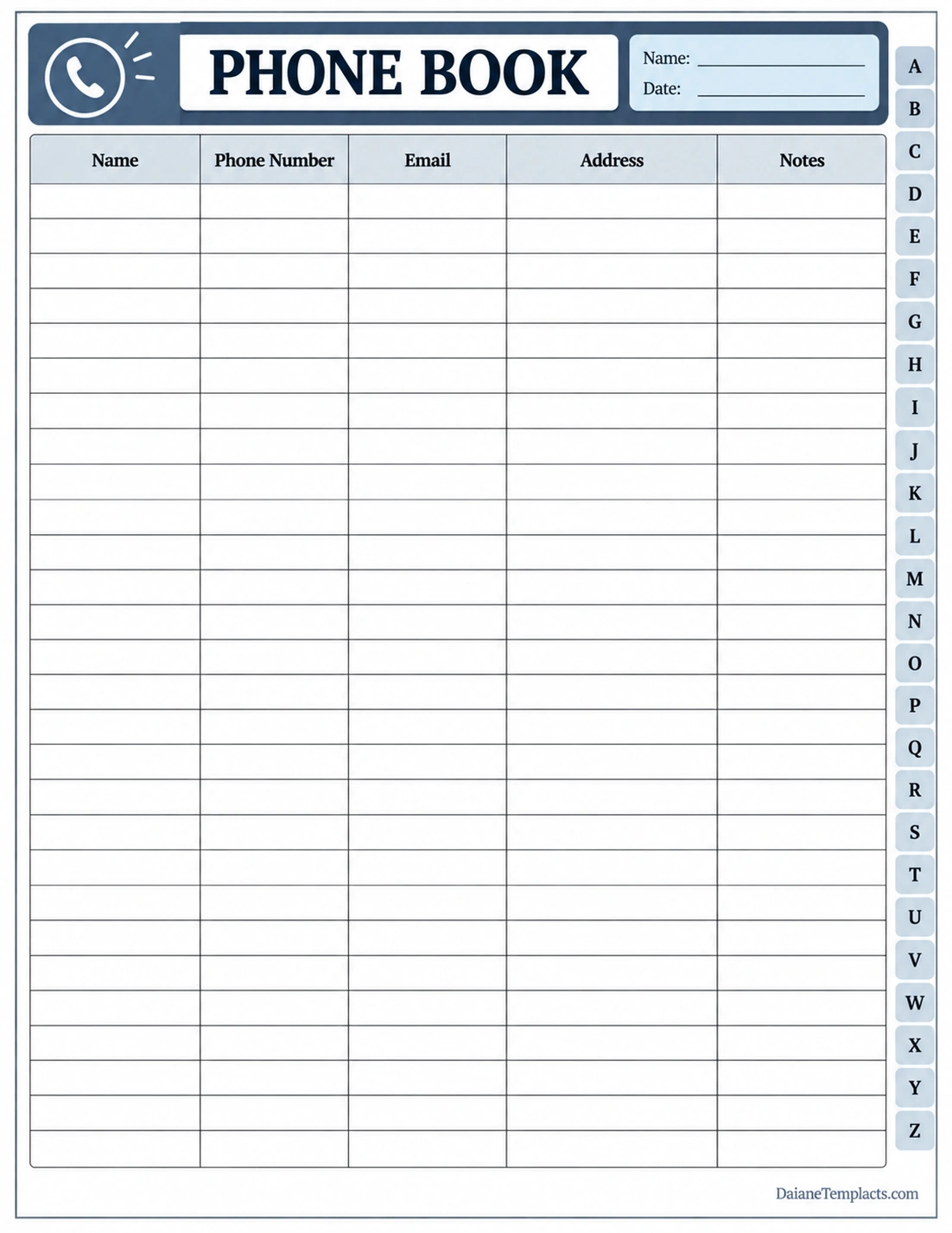
The template includes a title area, name and date fields, and a contact table with columns for names, phone numbers, email addresses, addresses, and notes. Alphabetical tabs help you organize entries and locate contacts more easily.
You can print additional copies when you need more space. For a personal phone book, include family members and trusted service providers. For a business directory, consider adding company names, departments, job titles, or preferred contact methods.
What Information Should a Phone Book Include?
The right information depends on how you intend to use your phone book. Include the details that help you identify and contact each person or organization without collecting unnecessary personal information.
Name or Business Name
Record the person’s full name or the official name of the business. If several contacts have similar names, add a useful identifier, such as a company, department, or relationship.
Telephone Number
Enter the correct phone number, including the country or area code when necessary. Distinguish between mobile, home, office, and other numbers if you need to store more than one number for a contact.
Email Address
An email address provides an alternative way to reach a contact. Check spelling carefully, especially when recording business addresses or email addresses with uncommon names.
Mailing Address
A mailing address may be useful for businesses, service providers, relatives, or contacts who receive letters and documents. Include only the address information you need and handle it carefully because it may be sensitive.
Notes and Contact Details
Use the notes field for brief, useful details, such as a business’s opening hours, the contact’s department, or the best time to call. Avoid storing passwords, account credentials, or unnecessary sensitive information in a general phone book.
How to Create and Organize a Phone Book
Creating a useful phone book starts with deciding which contacts you need to keep and how you will arrange them. A consistent system makes the directory easier to maintain over time.
- Step 1: Choose the format. Decide whether you prefer a printable phone book, notebook, spreadsheet, or digital contact list.
- Step 2: Gather contact information. Collect names, telephone numbers, email addresses, and other details from reliable sources.
- Step 3: Choose categories. Separate contacts into groups such as family, friends, work, healthcare, schools, businesses, and emergency services when useful.
- Step 4: Arrange entries alphabetically. Sorting by last name or business name makes contacts easier to find. Use the same rule throughout the directory.
- Step 5: Enter information clearly. Write legibly or type the details into the template. Include area or country codes when needed.
- Step 6: Check accuracy. Confirm that numbers and email addresses are correct before relying on the directory.
- Step 7: Store it securely. Keep a printed phone book in a convenient but appropriate location, especially if it contains personal information.
- Step 8: Review and update it. Verify important contacts periodically and remove or correct outdated entries.
Types of Phone Books and Contact Directories
Different phone books serve different purposes. Choosing the right type helps you keep the information relevant and easy to use.
Personal Phone Book
A personal phone book stores the contact details of family members, friends, neighbors, and other people you contact regularly. It can also include selected service providers and important personal contacts.
Family Phone Book
A family phone book organizes numbers for relatives, schools, healthcare providers, caregivers, and trusted household services. It can be particularly helpful when several household members need access to the same information.
Business Phone Book
A business phone book lists clients, suppliers, employees, partners, and service providers. Useful fields may include company names, departments, roles, office numbers, and email addresses.
Telephone Directory
A traditional telephone directory is generally a larger listing of telephone subscribers or businesses within a particular area. Printed directories historically used the White Pages for individual listings and the Yellow Pages for business categories.
Emergency Contact List
An emergency contact list focuses on numbers that may be needed quickly, such as local emergency services, family members, doctors, schools, or designated caregivers. Keep this list short, easy to read, and accessible to the people who may need it.
Tips for Keeping Your Phone Book Accurate
A phone book becomes less useful when numbers change and entries are not updated. A simple maintenance routine can keep your contact directory reliable.
- Verify important numbers: Confirm essential contacts directly with the person or organization.
- Update changes promptly: Correct phone numbers, email addresses, and business details as soon as you learn they have changed.
- Use consistent formatting: Record telephone numbers in a uniform style so they are easy to read.
- Remove duplicate entries: Combine repeated records to avoid confusion.
- Separate essential contacts: Keep emergency numbers in a clearly marked section for quick access.
- Review the directory regularly: Check entries every few months or whenever you notice outdated information.
- Protect personal information: Do not leave a directory containing private details where unauthorized people can easily access it.
- Keep a backup when appropriate: If you maintain a digital contact list, use a secure backup method that suits your devices and privacy needs.
Phone Book vs. Digital Contact List
A printed phone book and a digital contact list both help you organize telephone numbers, but they have different advantages.
- Printed phone book: Offers offline access, requires no battery, and can be shared with household members who prefer paper records.
- Digital contact list: Can be searched quickly, updated easily, and synchronized across supported devices.
- Traditional telephone directory: Provides a larger directory of listed individuals or businesses in a geographic area, depending on the publication.
For many people, using both a digital contact list and a small printed phone book is practical. Digital records are convenient for everyday use, while a printed list can serve as a backup for selected essential contacts.
Common Phone Book Mistakes to Avoid
Even a simple directory can become difficult to use when entries are inconsistent or incomplete. Avoid these common problems.
- Recording incorrect numbers: Double-check each number before saving or printing it.
- Using inconsistent alphabetical rules: Choose whether to sort people by first or last name and apply the rule consistently.
- Keeping outdated information: Remove or update entries that are no longer accurate.
- Adding unnecessary details: Include only information that serves a practical contact purpose.
- Ignoring privacy: Store personal addresses and phone numbers securely.
- Making entries hard to read: Use clear handwriting, sufficient spacing, and readable text.
Frequently Asked Questions About Phone Books
What is the main purpose of a phone book?
The main purpose of a phone book is to organize telephone numbers and contact details so users can find the people or businesses they need to contact.
What is the difference between the White Pages and Yellow Pages?
Traditionally, the White Pages listed residential or individual telephone subscribers, often alphabetically by name. The Yellow Pages organized businesses by industry or service category to help users find local providers.
Can I use a printable phone book template for business contacts?
Yes. A printable phone book template can organize client, supplier, employee, and service-provider information. You can customize the fields to include company names, departments, roles, email addresses, and notes.
Is a phone book still useful today?
Yes. Although online directories and digital contact lists are widely used, a printed phone book can provide offline access to important numbers and serve as a simple contact backup.
How should I organize a phone book?
Arrange contacts alphabetically and use categories when necessary. Keep the same sorting rule throughout the directory, and make sure the entries contain enough information to identify the correct contact.
What should I include in an emergency phone book?
Include essential emergency services, trusted family contacts, healthcare providers, schools, and other contacts relevant to your household. Verify the numbers and store the list somewhere accessible but secure.
How often should I update a phone book?
Update it whenever important contact details change. A periodic review every few months can also help you identify outdated numbers, duplicate entries, and contacts you no longer need.
Conclusion
A phone book remains a practical way to organize telephone numbers and essential contact information. Whether you need a personal contact book, family directory, business phone list, or emergency contact sheet, a clear structure makes information easier to find and maintain.
Use a printable phone book template to record names, phone numbers, email addresses, mailing addresses, and useful notes. Check entries for accuracy, organize contacts consistently, and protect private information. With regular updates, your phone book can serve as a reliable offline reference alongside your digital contacts.
Download: Phone Book Template
