A mailing label helps ensure that a package or envelope reaches the correct destination. It displays essential shipping information, including the recipient’s address, the sender’s return address, and, when applicable, tracking details or handling instructions. A clear, correctly formatted label makes it easier for postal services and shipping carriers to process deliveries efficiently.
Whether you’re mailing a personal gift, sending documents, shipping online orders, or managing business deliveries, using a proper mailing label can save time and reduce address errors. The right format also makes packages look organized and professional.
In this guide, you’ll learn what a mailing label is, what information it should contain, how to format one, and how to print labels for personal or business use. You’ll also find practical shipping tips, common mistakes to avoid, and answers to frequently asked questions.
What Is a Mailing Label?
A mailing label is a printed or handwritten label attached to an envelope, parcel, box, or other item being sent through a delivery service. It identifies where the item should go and may also show where it originated.
Depending on the shipment, a mailing label may include a barcode, tracking number, postage information, service type, or handling instructions. Shipping carriers use standardized label formats and machine-readable information to help process packages through their networks.
Mailing labels are commonly used for:
- Personal letters, cards, and parcels
- Online orders and e-commerce shipments
- Business documents and office mail
- Gifts and care packages
- International shipments
- Returns and exchanges
- Warehouse and inventory distribution
A basic address label can be created with a word processor or printable template. However, a carrier-generated shipping label may be necessary when postage, tracking, customs information, or a specific barcode is required.
What Information Should a Mailing Label Include?
The information on a mailing label depends on the type of shipment and the carrier’s requirements. For most domestic packages, clear sender and recipient details are the essential starting point.
1. Recipient’s Full Name
Place the recipient’s name near the top of the delivery address. For business shipments, include the company name and, when useful, the department or attention line.
Check the spelling carefully. An incorrect name may create confusion, particularly when several people or businesses share the same address.
2. Complete Delivery Address
The recipient’s address should include the street address, apartment or suite number when applicable, city, state or region, postal code, and country for international shipments.
For example, a typical US mailing address may follow this structure:
- Recipient name
- Street address and apartment number, if applicable
- City, state abbreviation, and ZIP Code
Use the address format recommended by the postal service or carrier handling the shipment. For international deliveries, follow the destination country’s postal conventions.
3. Sender’s Return Address
The return address identifies the sender and provides a destination if the package cannot be delivered. It typically includes the sender’s name or business name, street address, city, state or region, and postal code.
Place the return address in the position recommended by the carrier or postal service. Make sure it is clearly distinguishable from the delivery address.
4. Postage or Shipping Service Information
When required, the mailing label may display postage, a service level, or other shipping information. Examples include standard shipping, priority service, or international air mail.
Do not assume that printing an address label automatically pays for postage. A carrier’s official shipping label may need to be purchased or generated through an authorized shipping service.
5. Barcode and Tracking Number
Many shipping labels include a barcode or other machine-readable code linked to shipment information. Tracking details allow the sender and recipient to check delivery progress when tracking is included in the selected service.
Use the barcode and tracking number supplied by the carrier. Do not invent tracking codes or copy a barcode from another shipment, because doing so can cause processing errors.
6. Handling Instructions
Some packages need special attention. Labels may include instructions such as “Fragile,” “Handle With Care,” or other markings when appropriate.
Handling labels are supplementary information, not a guarantee of special treatment. Pack fragile or sensitive items securely and follow the carrier’s rules for restricted, hazardous, or temperature-sensitive materials.
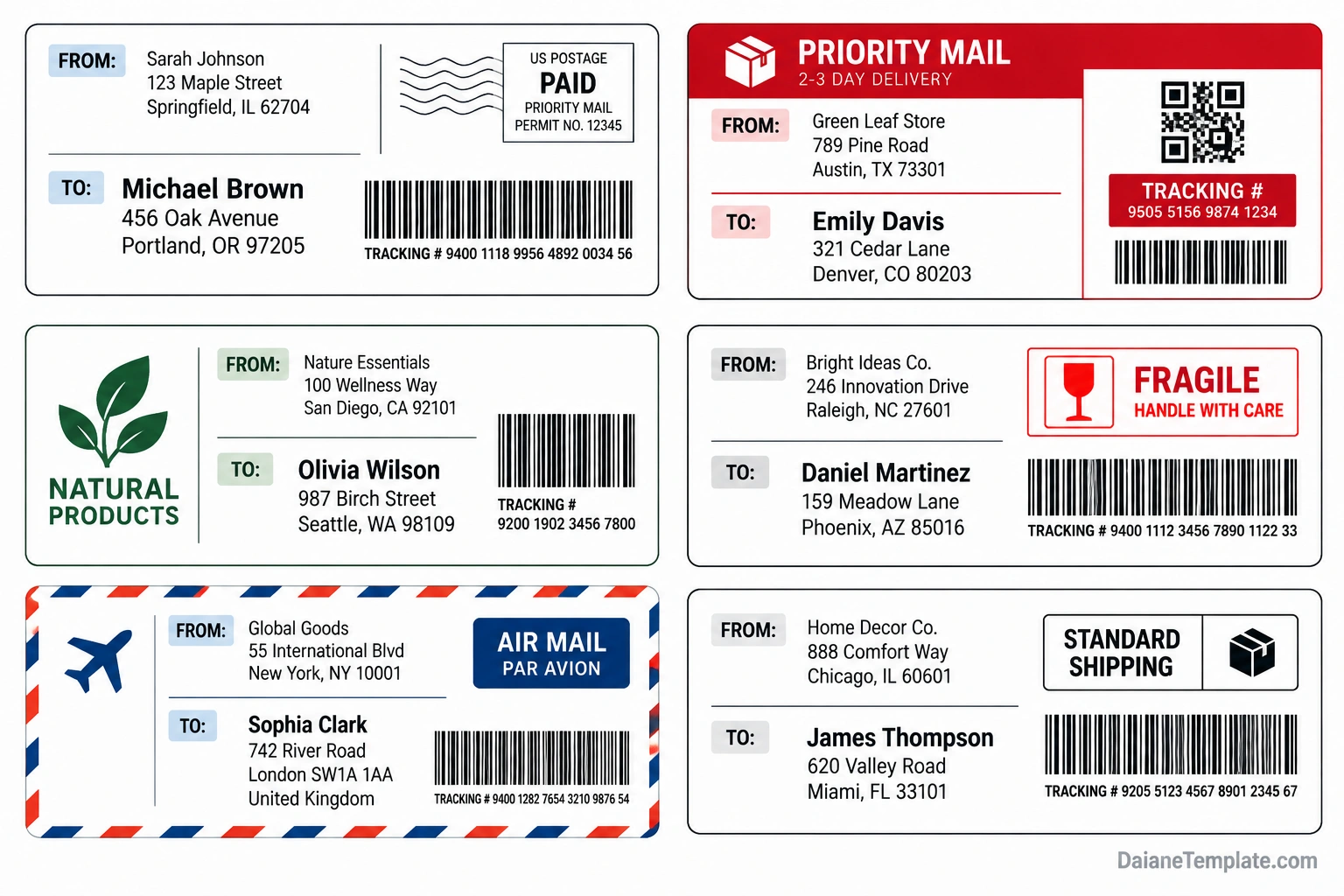
Types of Mailing Labels
Different shipments require different label formats. Choosing the right mailing label helps you include the necessary details without adding unnecessary information.
Standard Mailing Label
A standard mailing label usually displays the sender’s return address and the recipient’s delivery address. It is suitable for many everyday envelopes and packages when a separate carrier-generated label is not required.
Shipping Label
A shipping label commonly includes the delivery address, sender information, carrier details, a barcode, and tracking information when available. It may also include postage or service information generated by the carrier.
Priority Mail Label
A priority service label identifies a particular shipping service. Its design and wording should follow the applicable carrier’s requirements. Use the correct service label and packaging where the carrier specifies them.
International Mailing Label
International shipments may require additional details, such as the destination country, customs declaration information, a description of the contents, and other documentation. Requirements depend on the contents, destination, and shipping service.
Return Shipping Label
A return shipping label allows an item to be sent back to a seller, warehouse, or other destination. It may be provided by a retailer or generated through a carrier’s shipping system.
Fragile or Special-Handling Label
Special-handling markings communicate that a shipment may need extra care. They should be used only when relevant and should never replace suitable packaging or compliance with carrier instructions.
How to Create a Mailing Label Step by Step
Creating a mailing label is straightforward when you gather the correct information before printing. Follow these steps to prepare a label for personal mail or business shipping.
Step 1: Confirm the Shipping Details
Collect the recipient’s full name, complete delivery address, and any apartment, suite, or unit number. Confirm the postal code and check the address for spelling errors.
For business shipments, include the company name and any department or attention information needed for delivery.
Step 2: Add the Return Address
Enter the sender’s details in the designated area. Use a current address where undeliverable mail can be returned. If you’re shipping on behalf of a business, use the appropriate company return address.
Step 3: Choose a Suitable Layout
Select a mailing label template that fits the package or envelope. Keep the delivery address prominent and use a simple layout with enough space around each line.
For high-volume shipping, consider a label format compatible with your printer and the carrier’s requirements.
Step 4: Add Carrier Information When Needed
If you need postage, tracking, or a shipping barcode, generate the label through the appropriate postal service or carrier. Follow the carrier’s instructions for label size, barcode placement, and any required supporting documents.
A decorative or printable address template is not a substitute for an official postage-paid shipping label.
Step 5: Check the Label Before Printing
Review every line of the address, including the postal code, state abbreviation, and country. Make sure the text is readable and that important information is not cut off near the page margins.
Step 6: Print and Attach the Label
Print the label at a suitable quality and use paper or adhesive labels compatible with your printer. Attach it securely to a clean, flat surface on the package.
Keep the label away from edges, seams, and areas where tape or folds could obscure the address or barcode. If using clear tape over a label, ensure it does not interfere with barcode scanning or violate carrier instructions.
Mailing Label Size and Formatting Tips
There is no single size for every mailing label. The best dimensions depend on the package, printer, label stock, and shipping service.
Use Readable Text
Choose a clear font and a text size that remains readable when printed. Avoid decorative fonts for addresses and ensure there is enough contrast between the text and background.
Keep Address Information Organized
Place the recipient’s address in the most prominent area of the label. Keep the sender’s return address separate, and avoid adding decorative graphics that compete with the delivery details.
Leave Barcodes Unobstructed
Carrier-generated barcodes should remain clear, correctly sized, and unobstructed. Do not stretch, crop, recolor, or cover them. Follow the carrier’s instructions for placement and print quality.
Choose Printer-Compatible Materials
Check whether your printer uses inkjet or laser technology and choose compatible label sheets. If you print frequently, a dedicated label printer may improve convenience and consistency.
Common Mailing Label Mistakes to Avoid
- Incorrect postal codes: Verify ZIP Codes and international postal codes before printing.
- Missing apartment numbers: Include the unit, suite, or building details needed for delivery.
- Unclear text: Avoid tiny fonts, low contrast, and overly decorative designs.
- Missing return address: Add a return address when appropriate and required by the mailing method.
- Obstructed barcodes: Keep carrier-generated codes visible and scannable.
- Confusing sender and recipient details: Label each section clearly.
- Using an unofficial label for postage: Obtain postage and tracking through an authorized service when needed.
- Loose or damaged labels: Attach labels securely so they remain readable throughout transit.
Mailing Label Tips for Businesses and Online Sellers
Businesses can improve shipping accuracy by using a consistent mailing label process. Standardized formats reduce manual errors and make it easier to prepare multiple orders.
Use a Consistent Address Format
Keep address fields in a predictable order and use the same formatting rules across shipments. When possible, validate addresses through a reputable postal or shipping service before printing labels in bulk.
Match Labels to Orders
Check the recipient and shipping details against the correct order before attaching the label. This simple verification can help prevent packages from being sent to the wrong customer.
Protect Customer Information
Mailing labels contain personal or business address information. Limit access to shipping records, dispose of misprinted labels securely, and avoid reusing labels that contain another recipient’s details.
Keep Shipping Records
For shipments with tracking, retain the relevant tracking number and order reference. These records can help when responding to customer questions or investigating delivery problems.
Frequently Asked Questions About Mailing Labels
What should a mailing label include?
A basic mailing label generally includes the recipient’s full name and delivery address. A return address is also useful. Depending on the shipment, an official shipping label may include postage, a barcode, tracking information, and service details.
Can I print my own mailing label?
Yes. You can print your own address label using a word processor, label template, or compatible printer. However, postage-paid labels and carrier barcodes should be generated through the appropriate postal service or shipping provider when required.
Where should I place a mailing label on a package?
Place the label on a flat, visible surface, following the carrier’s instructions. Avoid seams, corners, folds, and areas that could hide the address or interfere with barcode scanning.
What is the difference between a mailing label and a shipping label?
A mailing label may simply display sender and recipient addresses. A shipping label often includes additional carrier-specific information, such as postage, service type, tracking details, and a machine-readable barcode.
Do mailing labels need a return address?
Including a return address is generally recommended because it helps identify where an undeliverable package should go. Requirements can vary by service and destination, so check the applicable postal or carrier rules.
Can I use a mailing label for international shipping?
You can use a mailing label for international shipments, but the package may also require a carrier-generated label, customs declaration, and other documentation. Confirm the destination country’s requirements and the shipping provider’s instructions.
Can I reuse a mailing label?
You should not reuse a label that contains an old address, tracking barcode, or shipment details. Remove or completely cover old labels before sending a reused package, and ensure only the correct current shipping information is visible.
Conclusion
A mailing label helps packages reach their intended destinations by presenting shipping information clearly and consistently. Including accurate recipient details, a useful return address, and any required carrier information can reduce errors and make shipping more efficient.
Before sending a package, verify the address, choose a suitable label layout, print clearly, and attach the label securely. For shipments that require postage, tracking, or customs documentation, use the appropriate postal service or carrier system. A reliable labeling process makes personal mailing and business shipping easier to manage.
Download: Mailing Label Template
